As a non-resident Indian (NRI), your NRO account generally includes earnings, savings, or inherited income in India. If you plan to repatriate the funds from your NRO account to an NRE or a foreign account, you first need to fill out Forms 145 and 146. Filling out these forms is essential to make a payment overseas. Through these forms, the Indian government can easily track foreign transactions and certify proper tax compliance. Want to know more about it? Well, then you are at the right place. This guide will help you better understand these forms and their role in Income tax. So, let's start reading.
Any person responsible for making a remittance from India to a non-resident or foreign company must file Form 146 with the Income Tax Department. Under the Income Tax Act of 1961, the payer must provide the required information. As mentioned above, Form 145 helps the Income Tax Department to track foreign payments and liable tax liabilities. Additionally, Form 145 facilitates the application of DTAA benefits such as lower or nil withholding tax, where applicable. Apart from this, Form 145 is submitted online on the e-filing portal of the Income Tax Department.
This is all about Form 145 and why Indian residents need to fill it out. Moving on, let's look at Form 146.
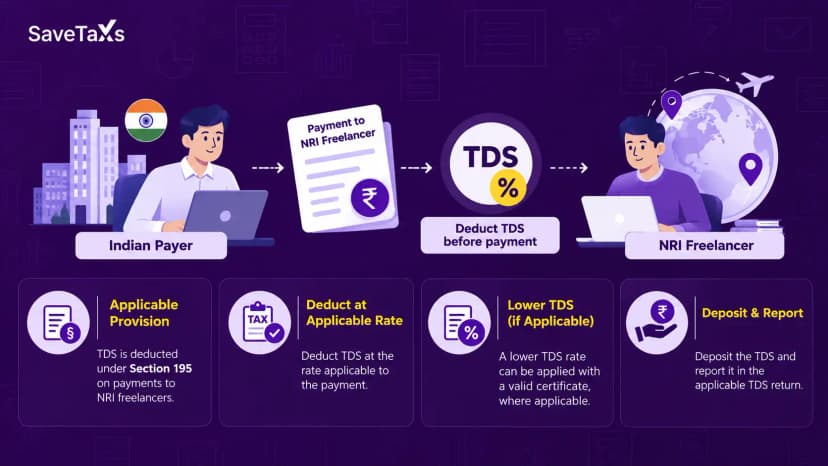
Form 146 is a certificate that is issued by a Chartered Accountant (CA). It verifies that the tax deducted at source (TDS) from the payment made to an NRI, foreign resident, or foreign company is as per the Double Taxation Avoidance Agreement (DTAA) and the Income Tax Act. The certificate consists of the payment details made to an NRI, the DTAA provisions, the TDS rate, and compliance with section 195 of the IT Act. Before remitting funds to an NRI, it is vital to complete Form 146.
This is all about Form 146 and who issues it. Moving ahead, let's know the applicability of filling out these forms.
Under the Income Tax Act, 1961, you need to file Form 145 and 146 when making payments to an NRI, foreign national, or a foreign company. The form selection depends on the type and remittance amount. To provide you with an idea, here is the applicability of the forms mentioned below:
Situations Where Form 145 is Required
These are the following situations where you need to fill out the Form 145:
- When making a payment to a non-resident or a foreign company, you need to fill out the Form 145, irrespective of whether it is taxable or not.
- The payer can be an Indian resident, an NRI, a foreign resident, a domestic company, or a foreign company.
- According to the provisions of Section 5 of the IT Act, 1961, when the income arises, accrues, is received, or is going to arise, accrue, or be received in India, it should be stated in this form.
Situations Where Form 145 is Not Required
These are the following situations where Form 145 is not required:
- You do not need to fill out this form when the payment is made, per the provisions of Rule 37BB regarding the list of payments.
- According to Section 5 of the Foreign Exchange Management Act (FEMA), 1999, a person does not need to file Form 145 when making a payment to a foreign individual or firm if the payment does not require RBI approval.
Circumstances Where You Need Form 146
Here is the list of the following circumstances where you need to fill out the Form 146:
- Form 146 is required when the payment is made to a non-resident, NRI, or a foreign company that is taxable.
- To make the payment, this form must be filed by a CA.
- “₹5,00,000 is an aggregate annual threshold per financial year, subject to taxability.
- When the assessing officer does not give any order.
Circumstances Where You Do Not Need Form 146
Here is the list of the following circumstances where you do not need to fill out the Form 146:
- There is no requirement to file Form 146 if the remittance amount is not taxable in India.
- If the receiver's residence country considers the income taxable, and the remittance is made in that country.
- If Part A of Form 145 is not filled out, then you do not need to provide Form 146.
- When an individual does not make the payment for buying a foreign asset or a tour operator in a foreign country. Additionally, if the remittance amount is not more than the stated limit of the RBI.
- When a person makes a payment to pursue higher studies overseas.
- Under sections 197 or u/s 195(2)/(3), this form is not needed when you obtain a certificate from the AO.
Payments Where Form 145 and 15CB Are Not Required
Here is the list of payments along with the purpose code as per the RBI, which does not require Form 145 and 15CB:
| Purpose Code as per RBI |
Nature of Payment |
| S0001 |
Investment overseas by Indians in equity capital (shares) |
| S0002 |
Investment overseas by Indians in debt securities |
| S0003 |
Investment overseas by Indians in wholly owned subsidiaries and branches |
| S0004 |
Investment overseas by Indians in associates and subsidiaries |
| S0005 |
Investment overseas by Indians in real estate |
| S0011 |
Loans extended to foreign citizens |
| S0202 |
Payment for the operating expenses of Indian shipping companies functioning overseas |
| S0208 |
Operating expenses of Indian Airlines functioning overseas |
| S0212 |
Booking of passages overseas- Airlines companies |
| S0301 |
Payment for business travel |
| S0302 |
Travel under basic travel quota (BTQ) |
| S0303 |
Travel for pilgrimage |
| S0304 |
Travel for medical treatment |
| S0305 |
Travel for higher studies (including hostel expenses, fees, and more) |
| S0401 |
Postal Services |
| S0501 |
Construction projects of Indian companies overseas, including imports of goods at the project site |
| S0602 |
Freight insurance- associated with the export and import of goods |
| S1011 |
Remittance for maintaining offices overseas |
| S1201 |
Maintenance of Indian consultants/embassies overseas |
| S1202 |
Payment by foreign consultants/embassies in India |
| S1301 |
Payment by non-residents, NRIs, towards savings and family maintenance |
| S1302 |
Payment towards donations and personal gifts |
| S1303 |
Payments towards donations to charitable and religious institutions overseas |
| S1304 |
Payment towards donations and grants to other charitable and government institutions established by the government |
| S1305 |
Donations or contributions made by the government to overseas institutions |
| S1306 |
Payment towards a refund or payment of taxes |
| S1501 |
Rebates or refunds, or a reduction in the invoice amount on account of exports |
| S1503 |
Remittance by residents for overseas bidding |
This was all about where you need to fill out Forms 145 and 15CB, and where they are not required. Moving on, let's look at the different parts of Form 145.
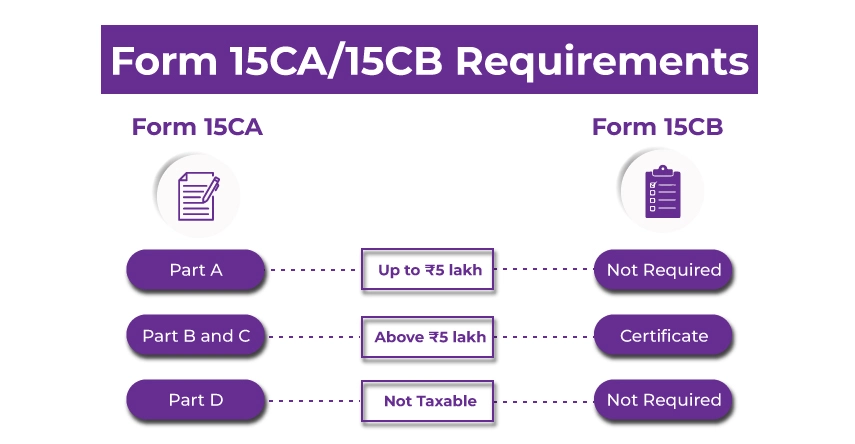
Form 145 is divided into four different sections. Based on the remittance structure, each section of Form 145 must be completed and submitted properly. Furthermore, the four parts of this form are as follows:
- Part A: If the remittance amount is taxable and its total does not exceed INR 5,00,000, then you need to fill out Part A of Form 145. This part of the form must be completed, regardless of whether the remittance is taxable in India.
- Part B: If the amount is more than INR 5,00,000 and falls under Section 197/195(2)/196(3) of the IT ACT, and the assessing officer issued a certificate, then this part must be filled out in the form.
- Part C: If the remittance amount is more than INR 5,00,000 and the remittance is taxable under the IT Act. In addition, the CA provided Form 146.
- Part D: Under a specific exemption, in case the remittance is covered, you need to fill out Part D of the form.
These are the components of Form 145. Moving forward, let's review the mandatory information you need to provide when completing Forms 145 and 15CB.
When filling out Form 145 and 15CB, here is the mandatory information that you need by your side:
- Details of Remitter (Sender)
- Name of the sender
- Address of the sender
- PAN Card of the sender
- Principal place of business of the sender
- Phone number and e-mail address of the sender
- Status of the sender (individual/company/other)
- Details of Remittee (Receiver)
- Name and status of the receiver
- Address of the receiver
- Country of the receiver (nation in which the payment is made)
- Principal place of business of the receiver
- Details of the Remittance (Payment)
- Name of the country where the payment is made
- The currency in which the payment is made
- Payment amount in Indian currency
- Proposed date of payment
- Nature of payment as per agreement (invoice copy from the client)
- Bank Details of the Sender
- Bank name of the sender
- The branch name of the bank
- BSR code of the bank
- Other Details
- The father's name of the signing person
- Designation of the signing person
- Documents Required from the Receiver
- Form 10F filed by the authorised person of the receiver
- A certificate stating that the receiver does not have any permanent address in India
- Tax residence certificate from the remittance receiver (tax registration of the country where the remittee is resident)
These are the mandatory pieces of information that you generally require while filling out Form 145 and 15CB. Moving further, let's know how you fill out these forms online.
Follow the steps below to file Form 145 and 15CB online:
Form 145
Using the e-filing portal of Income Tax, you can fill out Form 145 online. Additionally, the form is verified either by using an electronic verification code (EVC) or a digital signature. Follow the steps below to fill out Form 145 online:
Step 1: Log in to the official website of the Income Tax.
Step 2: Before filling out Form 145, add your CA. To do so, follow the mentioned steps:
- Select the tab, "Authorised Partners." Then, from the drop-down menu, click on the "My Chartered Accountant (CA)" option.
- You will be directed to the "My Chartered Accountant(s)" page. Here, click the 'Add CA' option.
- Now you need to mention the 'Membership number of the CA.'
- Then click 'Add' and confirm.
- Once you follow this process, you will receive a message indicating that your request to add CA has been successfully submitted; it is now pending your CA's acceptance.
Step 3: Process to fill out Form 145 online:
- Using your credentials, log in to your account from the E-filing portal. Then, go to "E-file"> "Income tax Forms"> "File Income Tax Forms."
- To do so, go to the 'File Income Tax Forms' page. Here, click on the 'Others' option (Not relevant income source) and select Form 145. You can also use the search box to find the Form 145.
- From the "instructions Page", click on the "let's get started" option.
- On the Information for remittance to non-resident page, choose "mode of submission" and the assessment year.
- Now, in Form 145, select Parts A, B, and C. Here is the information you need to mention as per your selected form part:
- Part A
- If the remittance is below INR 5,00,000 during an accounting year, then you need to choose this part.
- You need to include the sender's and receiver's information, as well as payment details. Additionally, there is no need to submit Form 146. Once you fill out the form, send it for verification.
- Part B
- This applies when, under Section 195(2), 195(3), or 197, you obtain approval from the assessing officer (AO).
- As in Part A, you also need to include details about the sender, receiver, and payment. The only difference in these two parts is that here you mention the details of the AO. Apart from this, you do not need to submit Form 146.
- Part C
- When your remittance is more than INR 5,00,000 during an accounting year, then you need to file Form 145 and also submit Form 146.
- In this section of the form, please provide information about the CA and attach the requested documents. These are additional details from the remitter and remittance that you need to fill in Part C.
- Once you have filled in all the requested details, click the "Assign to CA" option.
- Click 'Yes' to confirm. On your device, you will receive a message stating 'successfully assigned to the CA.'
- Now, from the dashboard, click on the 'Pending Actions' option.
- Once you click on that option, you will see the Form 146 uploaded by your CA. Now you can either accept or reject the Form 145 that you filled out online.
- If you accept the form, you will be taken to the 'e-verify' page. Using EVC or DSC, once you e-verified your form, you will receive a message stating "successfully submitted."
- Part D
- This section of the form is only applicable when the remittance is not taxable under the Income Tax Act.
- In Part D of the Form 145, you need to mention the details of the sender, such as their name, PAN number, contact, and address details, and more. Also, in this section, verification of the individuals submitting the form is needed. Once you've filled out all the requested information, click 'save.'
- After this, you also need to include the payment recipient's information and payment details.
- Based on your situation, once you complete the correct section of Form 145, verify the details and click the 'Preview' option.
- After verifying all the details mentioned, you need to e-verify your form using a digital signature certificate (DSC).
- Once everything is done, you will receive a success message with an acknowledgement number and a Transaction ID. You need to keep both things securely. In addition, you will receive a confirmation message on your registered mobile number and email ID.
Form 146
To fill out Form 146 online, follow the steps below:
- Before filling out Form 146, you must complete the 'Add CA' requirement.
- Now, under the authorised partners tab, choose my CA, and then the "Add CA" option.
- In this, you need to include the CA's membership number.
- After that, you have to assign your Form 146.
- Since you have now successfully added the CA, the remaining process will be completed by the CA.
- The CA's user account should be registered on the website as a CA, not as a general account.
- Now, under the e-file tab, choose the Income Tax Forms> File Income Tax Forms. Then, select Form 146 and click the File Now option. Here, you will see three options: online, offline/bulk mode upload, and manual submission.
- The manual option is only for filing and helps digitise the forms filed manually between 7 June and 15 August 2021.
- In the offline/bulk upload option, the file is processed by the offline utility.
- The online option lets you fill in the details and submit the form.
- Once you choose the form submit option and complete the remaining steps, proceed to the e-Verify option. Here, upload the Digital Signature Certificate (DSC) of the CA and file the forms.
- Now you have to upload your Form 146, and it should be successfully submitted by the CA, using the E-file Tab. You can view and download the form online using the e-file tab. To do so, log in to the website and see the form under the "worklist" tab by choosing the "For Your Information" button.
This is how you can fill out Forms 145 and 146 online by following the steps above. Moving ahead, let's know how you can apply for the forms offline.
Follow the steps below to file Form 145 and 146 offline/ bulk mode:
Form 145: Part A and B (Taxpayer)
Here is how you can fill in Part A and Part B of the Form 145:
- Using your credentials, log in to the e-Filing portal of income tax and go to "e-File"> "Income Tax Forms"> "File Form 145."
- Mention the Basic Details: You will find the PAN/ TAN number autofilled. You need to fill out the assessment year, submission mode, and filing type. Options like online, manual, and offline/ bulk mode are available there. Choose whichever one suits you best.
- According to the Press Release, the manual mode applies only to forms filled manually from 7 June 2021 to 15 August 2021.
- For offline/bulk upload, download the form using the offline utility.
- If you are choosing the online option to submit the form, fill in the required details online. After that, move towards e-verification. Upload the Digital Signature Certificate (DSC) of the authorized person and fill out the forms.
- Download the Form 145 Using Offline Utility: You can get the Form 145 from the Income Tax Website under the download section.
- After downloading the form, make separate XML files for remittee, remitter, and CA (only required for Part C). Once you do this, zip all the XML files. To complete part C, import the Form 146 in XML sent by your CA, which you downloaded from the view e-filed forms.
- Now, upload the zipped files and submit them. After submission, you will receive a token number.
- To check your submission status, visit "e-File"> "View Form 145 offline/ Bulk." Here you can see whether your file was submitted successfully.
- If the submission fails, the reason will be displayed on the screen. Here, you need to re-upload the correct XML file with fixed data/ validations.
Form 146
Here is how you can fill out Form 146 using offline/ bulk mode:
- Appointing a CA: To start the process, the first thing you need to do is appoint a CA. To do so, follow the mentioned steps:
- Using your credentials, log in to the e-filing portal and, under "Authorised Partners," go to "My Chartered Account (s)."
- Additionally, your CA provides the membership number and assigns Form 146 to him/her.
- Form CB: Parts A and B must be completed by CA.
- To download the filed form by the CA, log in to the e-filing portal and choose the "e-file"> "File Form 146."
- Fill in the general details like your user ID, PAN number, "offline/bulk submission and accounting year.
- To download the form, you have two options: either use the offline utility or download it from the Income Tax Forms page under the "download" section.
- Create separate XML files for the sender, receiver, and CA and zip them.
- Upload the zipped files to the site and use your DSC to submit them. Once you do all this, you will receive a token number.
- To know your file submission status, visit the "e-File" > "View Form 146 offline/ bulk." Here you can see whether your files were successfully submitted or not.
- If your file submission fails, you can resubmit with corrected data/validations. You can also download a PDF of your successful file submissions and an export containing the status, acknowledgement number (ARN), and XML filename for your failed files.
This is how you can fill both the Form 145 and 146 offline/ bulk mode.
Final Thoughts
This was all about the Form 145 and 146. Hope after reading this blog, all your queries get solved. The Indian government has made it mandatory to fill out Form 145 whenever NRIs or Indian residents repatriate funds overseas to NRE or a foreign bank account. Additionally, Form 146 submission depends on the type of Form 145 you are filing. Furthermore, if you have any tax-related queries or need assistance with ITR filing or the e-filing of Form 145 and 146? Connect with Savetaxs, our experts will not only help you file your ITR and Form 145 and 146 but also assist you in maximising your tax savings in India.