
Bookkeeping
Outsourced Bookkeeping: The Complete Guide to Services, Costs, Benefits & Choosing a ProviderOutsourced Bookkeeping: The Complete Guide to Services, Costs, Benefits & Choosing a Provider
Written by Hatim Dudhiyawala

You've probably already connected your business bank account to QuickBooks and expected most of the bookkeeping to happen automatically. The missing piece is that imported transactions still need review, categorization, matching, reconciliation, and financial oversight. In this guide, you'll learn how QuickBooks bookkeeping works, what tasks to complete regularly, which reports matter, and when professional bookkeeping makes sense.
QuickBooks bookkeeping is the process of recording, categorizing, reviewing, reconciling, and reporting business transactions in QuickBooks.
QuickBooks Online can automate parts of bookkeeping, but imported transactions still need to be reviewed and classified correctly.
Bank reconciliation compares QuickBooks records with financial account statements to identify discrepancies and maintain accurate records.
Regular bookkeeping improves financial visibility and gives tax professionals cleaner records to work from.
Profit & Loss and Balance Sheet reports help business owners understand financial performance and financial position.
DIY QuickBooks bookkeeping can work for simple businesses, while growing or complex businesses may benefit from a professional QuickBooks bookkeeper.
Monthly bookkeeping creates a repeatable financial process instead of leaving the business with a large cleanup project at tax time.
QuickBooks bookkeeping is the process of recording, categorizing, reviewing, reconciling, and reporting a business's financial transactions using QuickBooks. For example, a $500 software payment imported from a business bank account may need to be reviewed and categorized as a software expense before it appears correctly in financial reports.
Moreover, QuickBooks Online bookkeeping combines accounting software with an ongoing bookkeeping process. QuickBooks can import transactions, suggest categories, match existing records, and generate reports, but the business still needs a consistent system for reviewing financial activity.
For example, a $2,000 transfer from a business checking account to a business savings account should not automatically be treated as a $2,000 business expense. The transaction represents movement between accounts and therefore needs to be recorded appropriately.
In addition, bookkeeping involves more than recording expenses. A complete QuickBooks bookkeeping process considers income, expenses, assets, liabilities, equity, bank accounts, credit cards, supporting documents, reconciliations, and financial reports.
For a broader introduction to bookkeeping principles, see our guide to small business bookkeeping.
QuickBooks bookkeeping matters because accurate financial records help business owners understand income, expenses, profitability, cash activity, and the financial position of the business. For example, a company that receives $50,000 in customer payments cannot determine its actual profitability until its related business expenses are properly recorded.
First, accurate bookkeeping gives you better financial visibility. Consistent transaction categorization makes it easier to understand where business money comes from and where it goes.
Second, organized bookkeeping supports tax preparation. Properly maintained records give tax professionals a more reliable foundation when preparing or reviewing business tax information.
Third, reconciled accounts help identify discrepancies. For example, a duplicated transaction, missing deposit, incorrect amount, or unrecorded bank fee can cause your QuickBooks balance to differ from the financial institution's records.
Finally, clean bookkeeping supports better business decisions. A business owner can make more informed decisions about spending, hiring, cash reserves, and growth when financial reports are based on current records.
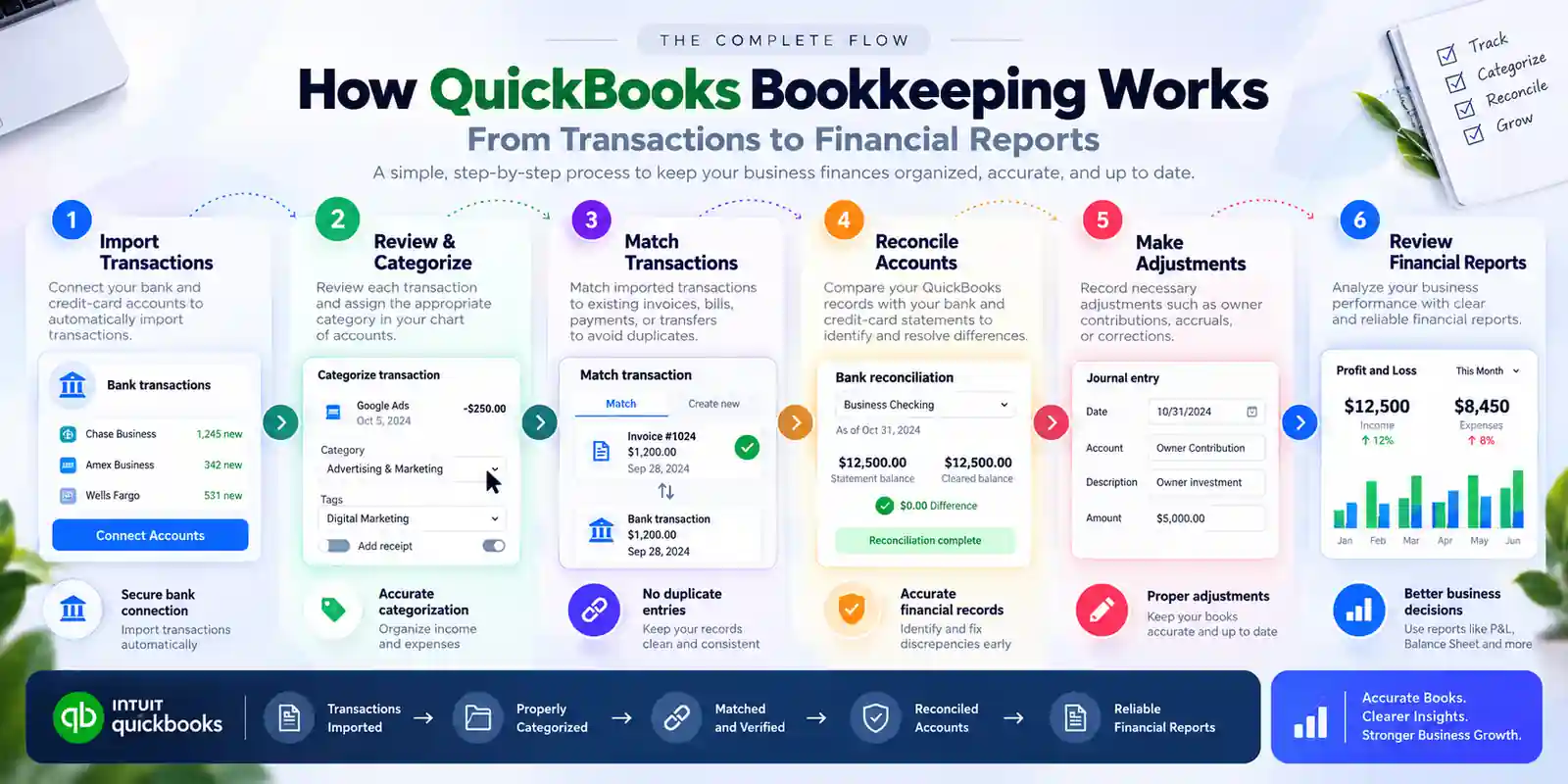
Doing bookkeeping in QuickBooks involves setting up the books, reviewing transactions, categorizing activity, matching existing records, reconciling accounts, and reviewing financial reports. For example, a typical monthly bookkeeping workflow can move from bank transactions to categorization, reconciliation, financial review, and reporting.
First, your QuickBooks company should be configured around the way your business actually operates. Setup can include business information, bank accounts, credit cards, customers, vendors, products or services, and the chart of accounts.
For example, a consulting business may need accounts for consulting revenue, software, advertising, professional fees, contractor costs, office expenses, bank fees, and owner-related transactions.
A poor initial setup can create problems later because an inappropriate chart of accounts can make financial reports difficult to understand.
Next, the chart of accounts organizes financial transactions into categories used for bookkeeping and reporting. Common account groups include income, expenses, assets, liabilities, and equity.
For example, a business may consistently record software subscriptions under a software or technology expense account rather than creating a separate expense category for every vendor.
Moreover, avoid creating unnecessary accounts simply because QuickBooks allows them. A useful chart of accounts should provide meaningful financial information without making routine bookkeeping unnecessarily complicated.
Then, connecting business bank and credit-card accounts can reduce manual transaction entry. Imported transactions can be reviewed within the QuickBooks banking workflow.
For example, instead of manually entering every card purchase, a business owner can review downloaded transactions and determine whether each one should be categorized, matched, or excluded.
However, a bank feed does not mean your books are automatically accurate. Imported transactions still require review because the appropriate accounting treatment depends on the transaction and business circumstances.
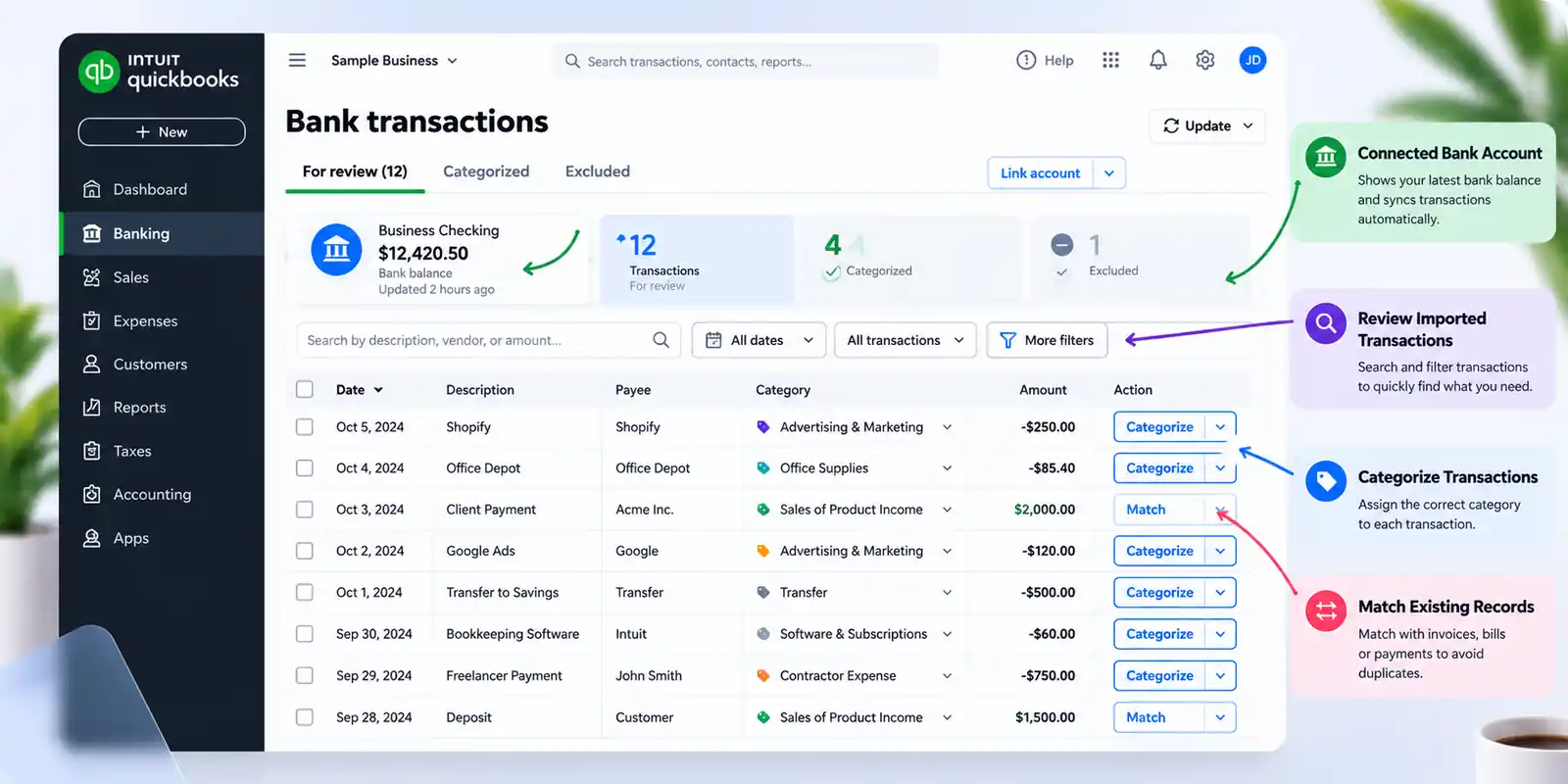
Next, transaction categorization assigns income and expenses to the appropriate accounts in your chart of accounts. Correct categorization matters because these classifications affect your financial reports.
For example, a payment to an advertising platform may belong under advertising expense, while a payment transferred between two business bank accounts should generally be treated as a transfer rather than an operating expense.
Some transactions may also need to be split. For example, one purchase could contain both office supplies and equipment, requiring the amounts to be assigned appropriately rather than posting the entire payment to one category.
Then, matching connects an imported bank transaction with a transaction that has already been entered into QuickBooks. Matching is useful when you have already recorded invoices, bills, receipts, payments, or transfers.
For example, if you manually recorded a customer payment and QuickBooks later imports the corresponding bank deposit, matching the two records helps prevent duplicate bookkeeping.
Matching and categorizing are different processes. Match a transaction when an appropriate QuickBooks record already exists; categorize it when the imported transaction needs to create a new bookkeeping record.
Next, bank reconciliation compares transactions recorded in QuickBooks with the corresponding financial-account statement. Reconciliation helps identify missing, duplicated, incorrectly entered, or otherwise inconsistent transactions.
For example, if a bank statement shows $18,500 while QuickBooks indicates $18,750 for the relevant reconciliation period, the $250 difference should be investigated rather than simply ignored.
A regular reconciliation process can reveal bookkeeping problems before they become larger cleanup projects.
Finally, QuickBooks financial reports turn categorized bookkeeping data into information that business owners can use. The appropriate reports depend on the business, but several reports are particularly useful.
| QuickBooks Report | What It Helps You Understand |
|---|---|
| Profit & Loss | Revenue, expenses, and profit over a selected period |
| Balance Sheet | Assets, liabilities, and equity at a specific date |
| Accounts Receivable | Outstanding customer balances |
| Accounts Payable | Unpaid bills and vendor obligations |
| Cash-related reports | Business cash activity and available cash information |
For example, reviewing the Profit & Loss every month can help a business owner identify whether revenue is increasing while expenses are also rising.
A QuickBooks bookkeeper maintains and reviews a business's financial records in QuickBooks so transactions are properly recorded, accounts are reconciled, and financial reports remain useful. For example, a QuickBooks bookkeeper may review monthly transactions, correct classifications, reconcile accounts, investigate discrepancies, and prepare financial reports.
In practice, QuickBooks bookkeeping tasks can include:
Reviewing bank and credit-card transactions
Categorizing income and expenses
Matching transactions to invoices, bills, receipts, or transfers
Reconciling bank and credit-card accounts
Reviewing accounts receivable and accounts payable
Maintaining supporting financial documentation
Identifying duplicate or unusual transactions
Reviewing Profit & Loss and Balance Sheet reports
Cleaning up historical bookkeeping errors
Communicating unresolved accounting questions to the business owner or accountant
Moreover, bookkeeping and tax preparation are different services. A bookkeeper can maintain financial records that support tax preparation, while tax-return preparation and tax advice may require an appropriately qualified tax professional.
QuickBooks bookkeeping should be performed on a schedule that keeps transactions current, accounts reconciled, and financial reports useful. For example, a business with frequent transactions may review its books weekly while completing a more comprehensive monthly close.
First, weekly bookkeeping can involve reviewing new bank transactions, categorizing expenses, matching payments, checking deposits, and attaching supporting documents.
For example, reviewing transactions every Friday can prevent several weeks of uncategorized transactions from accumulating.
Second, monthly QuickBooks bookkeeping typically involves reviewing transactions, reconciling accounts, checking outstanding receivables and payables, and reviewing financial reports.
For example, after closing September's books, a business owner can review September's Profit & Loss and Balance Sheet instead of discovering problems months later.
Finally, some transactions require additional review when they occur. These can include asset purchases, loans, owner contributions, owner distributions, unusual expenses, significant adjustments, and historical cleanup.
Common QuickBooks bookkeeping mistakes include incorrect categorization, duplicate transactions, unreconciled accounts, mixed personal and business activity, and inappropriate adjustments. For example, recording an owner transfer as a business operating expense can distort both profitability and equity.
First, do not assume every bank-feed suggestion is correct. Automated suggestions can save time, but each transaction should still be reviewed before being accepted.
Second, do not force a reconciliation simply to make the difference equal zero. A discrepancy can indicate missing transactions, duplicates, incorrect amounts, timing differences, or an incorrect opening balance.
Third, do not create duplicate transactions when an existing QuickBooks record can be matched. Duplicate income or expenses can distort financial statements.
Fourth, avoid mixing personal and business transactions whenever possible. Separate business accounts and consistent documentation make bookkeeping easier to maintain.
Finally, be cautious when changing previously reconciled transactions. Historical changes can create new discrepancies and may require professional bookkeeping cleanup.
DIY QuickBooks bookkeeping can work for businesses with straightforward transactions, limited financial complexity, and an owner who can consistently maintain the books. For example, a solo consultant with one business checking account and a manageable number of monthly transactions may be able to maintain the books independently.
On the other hand, outsourced QuickBooks bookkeeping can become valuable when transaction volume increases, the books are behind, or the business owner no longer has enough time to maintain them accurately.
| Business Situation | DIY QuickBooks Bookkeeping | Professional Bookkeeping |
|---|---|---|
| Few monthly transactions | Often practical | Optional |
| Simple business activity | Often practical | Useful for review |
| Multiple financial accounts | More time-consuming | Often beneficial |
| High transaction volume | Difficult to maintain | Often beneficial |
| Historical cleanup required | Higher risk of errors | Strong candidate |
| Complex transactions | Requires more expertise | Strong candidate |
| Owner lacks bookkeeping time | Poor fit | Strong candidate |
| Regular financial reporting needed | Possible | Often beneficial |
Importantly, hiring a QuickBooks bookkeeper is not only about data entry. A quality bookkeeping service should provide a repeatable process for transaction review, categorization, reconciliation, reporting, documentation, and identifying issues that require additional attention.
A QuickBooks bookkeeping service should provide accurate transaction management, regular reconciliation, useful reporting, transparent communication, and a defined process for resolving bookkeeping issues. For example, a monthly service should make it clear what gets reviewed, when accounts are reconciled, which reports you receive, and how unresolved questions are handled.
When evaluating a provider, look for:
QuickBooks experience: The bookkeeper should understand QuickBooks workflows rather than simply entering transactions.
Reconciliation process: Ask how bank and credit-card accounts are reconciled and reviewed.
Monthly close process: Confirm whether the provider follows a consistent monthly bookkeeping schedule.
Cleanup capability: If your books are behind, determine whether the provider handles historical bookkeeping cleanup.
Financial reporting: Ask which reports are included and how frequently they are delivered.
Communication: Establish how bookkeeping questions, unusual transactions, and missing documents are handled.
Tax-professional coordination: Determine whether the bookkeeper can provide organized records to your CPA, EA, or tax preparer.
Transparent pricing: Make sure you understand what is included and which services may cost extra.
For businesses that need ongoing support, Savetaxs bookkeeping services can be positioned as a professional option for maintaining and reviewing small-business books.
QuickBooks Online provides tools that can streamline routine bookkeeping, but each tool works best when combined with an appropriate review process. For example, bank feeds can reduce manual data entry while transaction rules can help automate predictable recurring classifications.
Bank rules can be useful for repetitive transactions. For example, a recurring software subscription with consistent transaction details may be suitable for a bookkeeping rule, while an unusual legal or equipment payment may deserve manual review.
Supporting documentation is equally important. Receipts, invoices, bills, deposit records, and other supporting documents help explain why transactions were recorded and provide evidence for the underlying financial activity.
You can also use QuickBooks alongside external tools for document collection, receipt management, reporting, and workflow management. Free or lower-cost spreadsheet and document-storage tools can support simple processes, but businesses should choose tools based on their recordkeeping needs rather than adding software unnecessarily.
For foundational concepts, see our bookkeeping basics guide if available on Savetaxs.
The next step is to create a repeatable bookkeeping routine rather than waiting until tax season to clean up your records. For example, a monthly bookkeeping checklist can ensure that transactions are reviewed, accounts are reconciled, reports are checked, and unresolved questions are documented.
Start with these actions:
Review your QuickBooks setup and chart of accounts.
Connect appropriate business financial accounts where supported.
Review and categorize transactions consistently.
Match existing records carefully to avoid duplicate entries.
Reconcile bank and credit-card accounts regularly.
Review financial reports after completing the monthly bookkeeping cycle.
Maintain supporting documents for business transactions.
Separate bookkeeping questions from tax or accounting questions that require professional advice.
Consider professional bookkeeping services if your books are behind, transaction volume has grown, or you no longer have time to maintain them.
If you need a broader process for maintaining your books, our guide to small business bookkeeping provides additional context.
QuickBooks bookkeeping is the ongoing process of maintaining business financial records through transaction review, categorization, matching, reconciliation, documentation, and financial reporting. QuickBooks can automate parts of the workflow, but accurate bookkeeping still depends on correct setup, appropriate classification, regular reconciliation, and human review.
Ultimately, the goal is not simply to make your QuickBooks account look complete. The goal is to maintain financial records that accurately represent your business and provide reliable information for management and tax preparation.
DIY QuickBooks bookkeeping can be practical for businesses with simple financial activity and enough time to maintain their records consistently. However, professional QuickBooks bookkeeping services can be valuable when books are behind, transactions become more complex, or bookkeeping starts taking time away from running the business.
If your business needs consistent monthly bookkeeping, reconciliation, reporting, or bookkeeping cleanup, Savetaxs bookkeeping services can provide a starting point for professional support.
This article is for general informational purposes only and does not constitute tax, legal, financial, or investment advice. Laws, regulations, rates, and procedures may change over time and may vary based on individual circumstances.
While SaveTaxs makes reasonable efforts to keep the information accurate and up to date, readers should verify applicable rules with official authorities or consult a qualified professional before making decisions based on this information.
Hatim Dudhiyawala is a Certified Public Accountant (CPA) with SaveTaxs and specializes in Indian and NRI taxation. He advises individuals, NRIs, and businesses on income tax filing, capital gains taxation, DTAA benefits, fund repatriation, and tax compliance. With experience in cross-border tax matters, Hatim helps taxpayers understand complex regulations and make informed decisions. Through his articles, he shares practical insights to help readers stay compliant and manage their tax obligations with confidence. See Full Bio
Want to read more? Explore Blogs