

NRI Income Tax Compliance
Tax Planning for High-Income NRIs in the US: RSUs, Bonuses and EquityTax Planning for High-Income NRIs in the US: RSUs, Bonuses and Equity
Written by Vipul Jain
You filed your ITR, and you are waiting to get the refund. However, after submitting, you realize that the bank account details you provided are wrong, outdated, or linked to an account that has been closed for a long time. This situation may seem stressful, but don't worry, you can fix it easily.
The Income Tax Department permits you to update your bank details after filing. The process can be completed entirely online through the e-filing portal. The key is to act quickly before your return is processed and the refund is dispatched.
Keep reading further to know how to update bank details after ITR filing, what to look out for as an NRI, and what happens if the refund is credited to the wrong account.
Before we move further with understanding how to correct bank account details on the Income Tax Portal after ITR filing, let's see why NRIs may have to update them. Here are some common reasons why NRIs might need to update their bank account details after filing:
Now comes the next question: can you update the details after the ITR is filed? Let's discuss that.
Get expert solutions and guidance for all your NRI banking issues at Savetaxs.
Yes, you can update your bank account information on the income tax e-filing portal at any point. If you complete the update and pre-validation before a refund is issued, the updated account will become eligible to receive the refund.
Moreover, you must submit a refund reissue request after updating and pre-validating your bank account if the refund has already been processed or failed.
In short, you can update your bank details through the e-filing portal if your return is still being processed. This will help the refund go to the updated account. Similarly, you must request a refund reissue after correcting bank account details after ITR filing if the refund has already been processed.
It's advised to act quickly after filing to identify any errors before the refund is dispatched. Next comes the main part, which is the steps to update the bank account details.
The entire process to correct bank account details after filing the ITR can be completed online. Here is how to correct bank account details after filing ITR:
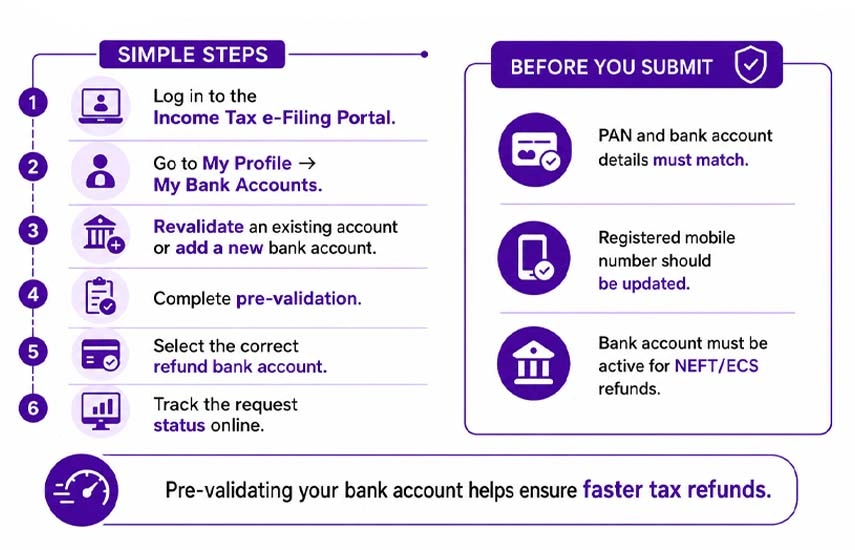
Visit the official income tax website and log in using your PAN, password, and the OTP sent to your registered mobile number or email.
From the dashboard, go to "My Profile → My Bank Accounts. This section will show all the bank accounts that are currently linked to your PAN.
If an existing account appears with incorrect details, like the wrong IFSC, outdated account number, etc., select it and click on 'Revalidate'. Enter the corrected information and submit for verification.
If you wish to add a completely new bank account, then
The system will verify your account against bank records, and then you will recieve a confirmation upon successful pre-validation.
After pre-validation, choose the correct account as your refund account. You can nominate only one account at a time for a refund. Confirm that the nominated account is active and capable of receiving electronic transfers.
You also have the option to submit a service request if your return has been filed but is still pending processing. Here is how you can do it:
Under 'Service Request', monitor the progress by clicking on 'View Request'. After submission, the pre-validation is usually completed within a few working days. However, the exact processing time depends on your bank and the system's verification processes.
In pre-validation, the following requirements are checked:
Moving further, let's understand what happens if your tax refund is sent to the wrong bank account.
If your return has been processed already and the refund was sent to an incorrect account, you don't need to panic. We will discuss what happens if such a situation occurs and the actions you need to take:
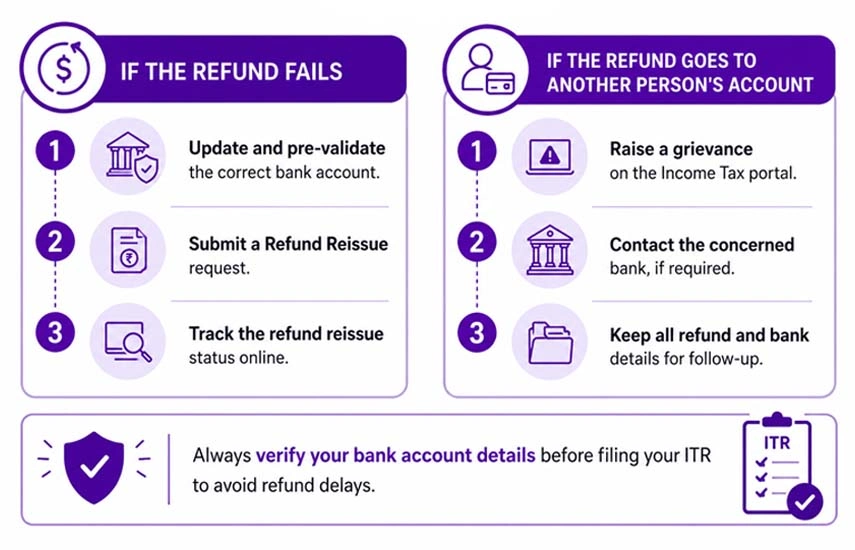
The banks usually return the amount to the Income Tax Department if the provided account number is wrong or the account is closed. Therefore, the portal will update your refund status to 'Refund Failed' or 'Return Returned'.
This is a more complex situation. If the bank account belonged to someone else, you may be required to file a grievance. For example, this can happen when you type the wrong account number mistakenly. You can file a grievance through the 'e-Nivaran' or 'grievance' section on the portal.
Also, you can contact the bank where the incorrect credit was received (in some cases). The resolution may take time, and this is one reason why verifying the account details is important before filing. Don't be confused, let's take the help of an example to understand this clearly.
Pooja, who worked in the USA for six years, returned to India in 2024. In India, she filed her ITR for AY 2025-26 using an old NRO savings account number that she had used while abroad. and got it converted to a regular savings account after returning to India. However, her refund of ₹38,000 failed.
It happened because the NRO account she listed had changed during the bank's internal restructuring. After two months of filing, she received a 'Refund Failed' notification. Pooja quickly logged into the income tax portal, went to the ' My Bank Accounts' section, and updated it by adding her new savings account number and the updated IFSC.
Her portal’s mobile number matched her bank's, which allowed for pre-validation within 48 hours. After that, she submitted a Refund Reissue request for the newly pre-validated account, and her refund was credited 19 working days later.
The entire process was completed online without any office visits or phone calls because she acted quickly and made sure her mobile number was consistent across both the portal and the bank.
At last, we will discuss the common mistakes that NRIs need to avoid.
Here are some of the most common mistakes that NRIs must avoid;
If you act before the return is processed and the return is dispatched, the process of updating bank details after filing the ITR becomes easy. Once your account is pre-validated, the entire process can be completed online in just a few minutes. Additionally, you don't even need to visit a tax office or bank branch in person.
NRIs must ensure that their bank account is active and pre-validated before filing. Also, check whether your number matches across both the portal and your bank. Moreover, if you are still confused about the process or need help with ITR filing, connect with Savetaxs.
At Savetaxs, we have a team of experts who are skilled and knowledgeable about the ITR filing process. Our team can help you with the entire process to ensure accuracy and compliance. We can also help you clear any doubts to make sure you have complete peace of mind. Connect with us right away, as we are working 24/7 across all time zones.
This article is for general informational purposes only and does not constitute tax, legal, financial, or investment advice. Laws, regulations, rates, and procedures may change over time and may vary based on individual circumstances.
While SaveTaxs makes reasonable efforts to keep the information accurate and up to date, readers should verify applicable rules with official authorities or consult a qualified professional before making decisions based on this information.
Shubham Jain is the Founder of SaveTaxs and has extensive experience in Indian and NRI taxation. He advises individuals, NRIs, and businesses on tax filing, tax planning, capital gains, DTAA benefits, fund repatriation, and compliance matters. He regularly writes about taxation and related financial topics. His focus is on making complex tax concepts easy to understand. Through his articles, he helps taxpayers stay informed, avoid common mistakes, and stay compliant with Indian tax laws. See Full Bio
Want to read more? Explore Blogs