
PAN Card

How to Link PAN Card With Bank Account Number?

  • April 3, 2026
  • 9 mins
  • 10.0K Views
Link PAN Card With Bank Account Number

The Income Tax department made linking PAN with bank accounts mandatory for all taxpayers, regardless of whether it's a savings or a current account. It is because it ensures compliance with income tax rules, conducting high-value transactions, opening a demat and trading account, and engaging in international transactions, etc.

PAN can be linked with a bank account, both online and offline. Every taxpayer must know how to link PAN with a bank account. They can easily link or pre-validate their banks via the e-filing portal. In this blog, we will discuss how to link a PAN card with a bank account.

Key Takeaways
  • Linking your PAN card with your bank account is mandatory for all taxpayers to ensure compliance with income tax regulations and facilitate various financial services.
  • PAN-Bank account linking is required for high-value transactions, opening demat and trading accounts, and conducting international transactions.
  • Taxpayers can link their PAN card with their bank account through both online methods (mobile banking and net banking) and offline methods (in-person at bank branches or via phone banking).
  • It's crucial to verify the connection after linking through your bank's portal or app and keep a record of the acknowledgment number for future reference.

Why is Linking PAN Card With a Bank Account Important?

Linking your PAN card and a bank account is important for several reasons, some of which are as follows:

  • Linking PAN with a bank account is required for opening a demat and trading account, enabling you to invest in securities.
  • For individuals engaged in international transactions, linking a PAN with a bank account is important for complying with foreign exchange rules.
  • Linking your PAN with a bank account helps in tracking and avoiding potential tax evasion and other financial irregularities.
  • It is important for income tax compliance and for conducting high-value transactions.
  • Linkage of PAN is required for verification purposes by the bank when applying for a credit card.

Internet Banking (Net Banking)?

There are various ways to link your bank account with your PAN card online. Here are the ways through which you can complete the linking process:

Mobile Banking Application

Follow these steps to link your PAN with your bank account using your bank's mobile app:

  • Step 1: Download your bank's mobile banking app from the app store.
  • Step 2: Log in to the app using your credentials.
  • Step 3: Look for the PAN linking or KYC option in the app.
  • Step 4: Enter your PAN card details accurately and carefully.
  • Step 5: Submit the details and complete any other verification process.

Internet Banking (Net Banking)

Here are the steps to link your PAN with your bank account through net banking:

  • Step 1: Visit your bank's official website.
  • Step 2: Log in to your net banking account using your credentials.
  • Step 3: On the dashboard, find the PAN linking or KYC section.
  • Step 4: Fill in the required information as per the details on your PAN card.
  • Step 5: Submit the information to confirm the linking process.
End-to-End Expert PAN Card Support

Get professional help with PAN card application, update, correction, and linking at Savetaxs. 

Here are the ways through which you can link your bank account with a PAN card offline:

Visiting the Bank Branch

Follow the steps below to link your PAN with your bank account in person by visiting your bank's home branch:

  • Step 1: Visit your home branch where you have your account.
  • Step 2: Request a PAN card update form (also called the KYC form) and fill out all the required fields on the form accurately.
  • Step 3: Submit the completed form and a self-attested photocopy of your PAN card. Also, you may have to submit a written request to the Branch Manager for updating your PAN details in your account.

Phone Banking

Here's how you can link your PAN with your bank account:

  • Dial the toll-free customer care number of your bank. You can find this number on your bank's passbook, chequebook, pamphlets, or other documents.
  • Find the IVR option and connect with the PAN card customer care executive.
  • Notify the executive regarding your intention behind linking your PAN with your bank account.
  • Provide the required information, like your account number, address, debit card number, etc., for verification of your credentials.
  • Provide your PAN to the executive and verify that the accurate PAN has been recorded.
  • Once you have registered, wait for up to two days for your request to be processed. After that, the bank will link your PAN to your bank account.

Linking PAN Card With Bank Accounts for NRIs

An NRI (Non-Resident Indian) also needs to link their PAN with their Indian bank accounts, especially NRE (Non-Resident External) and NRO (Non-Resident Ordinary) accounts. The linking process is mostly the same as for Indian residents and can be completed via net banking or mobile banking. Also, by contacting the bank via email or in-person through a branch visit.

Linking PAN with Aadhaar is not a mandatory requirement for NRIs. However, banks may request some additional documents, such as a passport, a visa, or overseas address proof for verification.

Important Points NRIs Must Know

Here are some important points related to linking your PAN card with your bank account that an NRI must know:
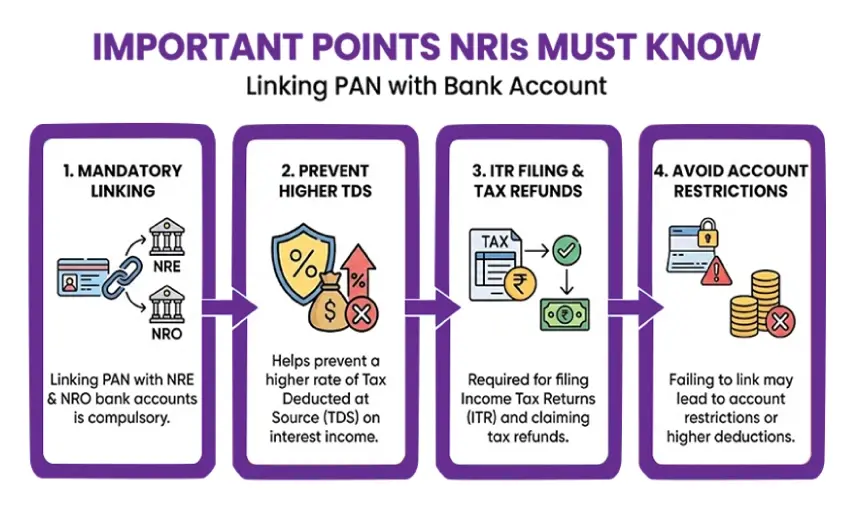
Important Points NRIs Must Know

  • Linking PAN with bank accounts is mandatory for NRE and NRO bank accounts.
  • It helps prevent a higher rate of TDS on interest income.
  • A bank account linked with a PAN card is required for filing ITR ( income tax returns) and claiming tax refunds.
  • Failing to link may lead to account restrictions or a higher rate of deductions.

How to Download Acknowledgement for PAN-Bank Linking?

After successfully linking your PAN to your bank account, it's important to verify the connection. To do the same, follow the steps below:

  • Visit your bank's net banking portal or mobile application.
  • Navigate to the PAN linking section, typically found under profile settings or KYC updates.
  • You should receive a confirmation message or be able to download an acknowledgment if the linking was successful.

Make sure to download and save the PAN card acknowledgment number for future reference, especially for income tax returns (ITR) filing.

Key Benefits of Linking PAN Card With Bank Account

Linking the PAN number with the bank account not only ensures compliance but also offers several other benefits, which are as follows:

  • Access to Government Benefits: With your PAN linked, you can receive eligible government benefits and subsidies, as well as avoid increased TDS deductions on specific incomes.
  • Important for Large Transactions: For any financial transaction that exceeds Rs. 50,000, it is essential to provide your PAN or Form 60 to ensure compliant and smooth processing.
  • Tracking by Income Tax: The Income Tax Department uses your linked PAN to monitor your spending in relation to reported income, which helps in audits and tax assessments.
  • Preventing Black Money: The requirement for PAN cards in financial transactions is important in fighting the circulation of unaccounted or illegal funds, commonly referred to as black money.
  • Avoiding Duplicate Accounts: By linking your PAN with your bank account, you help prevent the creation of duplicate accounts and ensure a consistent financial identity at all branches.
  • Tax Filing Ease: The linkage simplifies the tax filing process and helps ensure that you don't overlook any eligible tax benefits or deductions.
Secure and Compliant NRI PAN Service

Get 100% digital, secure, and compliant solutions for all your PAN card needs.

Talk To Our Experts Today!Connect Now

Bottom Line

For anyone involved in tax filing or receiving subsidies, understanding how to link a PAN card with a bank account is essential. The process can be completed online, via mobile apps, or in person at a branch and is straightforward, reducing the risks of delays in tax refunds. Linking your PAN with your bank account not only ensures financial compliance but also provides quick and easy access to various government services.

Furthermore, if you need additional guidance on PAN card services, Savetaxs is here at your service. We have been serving NRIs and individuals from more than 90 countries with their PAN card applications, including new PAN card applications, reprinting applications, PAN-Aadhaar linking, PAN for foreign nationals, and more. Contact us right away, as we are actively working 24/7 across all time zones.

Note: This guide is for information purposes only. The views expressed in this guide are personal and do not constitute the views of Savetaxs. Savetaxs or the author will not be responsible for any direct or indirect loss incurred by the reader for taking any decision based on the information or the contents. It is advisable to consult either a CA, CS, CPA or a professional tax expert from the Savetaxs team, as they are familiar with the current regulations and help you make accurate decisions and maintain accuracy throughout the whole process.

Ritesh Jain
Ritesh Jain(Tax Expert)

Mr. Ritesh has 20 years of experience in taxation, accounting, business planning, organizational structuring, international trade financing, acquisitions, legal and secretarial services, MIS development, and a host of other areas. Mr Jain is a powerhouse of all things taxation.

Recent Post

Want to read more? Explore Blogs

Frequently Asked Questions

No, a PAN card will not be automatically linked to a bank account. You need to link your PAN number with your bank account when you open a new one or later via the bank's net banking portal.

You can link your PAN card with your bank account online by logging into your bank's net banking portal or mobile banking app.

Yes, you must link both accounts with your PAN card, even if they're in the same bank. Linking your PAN card with your bank account helps you in conducting various financial transactions, like opening a fixed deposit account, depositing more than Rs. 50,000, preventing higher TDS deductions, and more.

You can check which bank account is linked to your PAN number by logging into the income tax e-filing portal and checking the banking account number mentioned under the 'Profile' section.

A PAN card is not always mandatory to open a bank account. You can submit any government-recognised identity and address proof document to open a bank account.