NRI Income Tax Compliance
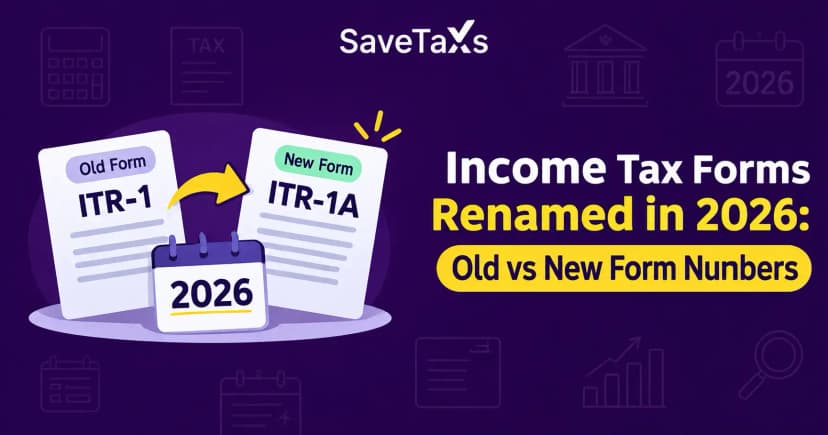
Income Tax Forms Renamed in 2026: Old vs New Form NumbersIncome Tax Forms Renamed in 2026: Old vs New Form Numbers
Written by Vipul Jain
_1771486937059.png&w=3840&q=75)
If you have been putting off your income tax return because the online process seems complicated, you are not alone. The main challenge is usually knowing which ITR form to choose, what information to prepare, and how to complete verification. In this guide, we explain how to file ITR online step by step so you can complete the process with fewer errors.
Online ITR filing means submitting your income tax return electronically through the Income Tax Department's e-Filing portal.
Required information generally includes your PAN, bank details, income records, tax information, and applicable deduction details.
The correct ITR form depends on your income sources and applicable circumstances.
AIS/TIS and other tax records should be reviewed and reconciled with your own financial records before submission.
E-verification is an essential step after submitting an ITR and can be completed through several available methods.
The acknowledgement should be saved after filing so you have a record of your submission.
Complex tax situations may require checking the applicable rules or consulting a tax professional.
Online ITR filing is the process of submitting an income tax return electronically through the Income Tax Department's e-Filing portal. Instead of submitting a physical return, you enter or confirm your information online, submit the return, and complete the applicable verification process.
For example, a salaried taxpayer can review Form 16 and available tax information, confirm salary and tax details in the online return, submit the ITR, and then e-verify it.
The official Income Tax Department portal currently provides online filing options for several individual ITR forms, including ITR-1, ITR-2, ITR-3, and ITR-4 for AY 2026-27.
Accurate online ITR filing helps you formally report your income and tax information to the Income Tax Department. A correctly completed and verified return also gives you a record of the information submitted for that assessment year.
Moreover, checking your tax information before submission can help identify missing income, incorrect deductions, or inaccurate bank details. For example, comparing your records with AIS/TIS can help you identify income or transactions that need attention before you submit the return.
Before filing an ITR online, you should keep your identification, income, tax, bank, and deduction-related information ready. Preparing these details first makes the online filing process easier and reduces the chance of having to stop midway.
Common information may include:
PAN and applicable identification details
Bank account information
Form 16, where applicable
Salary, pension, freelance, or business income details
Interest and other income records
Capital-gains information, where applicable
TDS/TCS information
Details of eligible deductions and tax payments
AIS/TIS and other relevant tax records
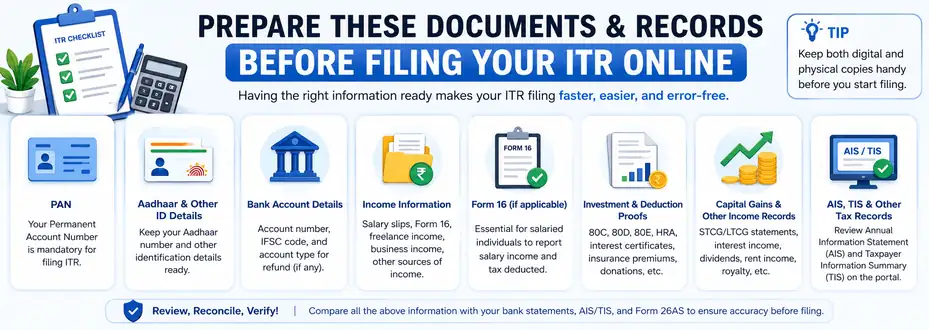
AIS/TIS information should not simply be copied without review. You should compare available information with your own records and investigate discrepancies before submitting the return.
The online ITR filing process involves preparing your information, selecting the appropriate return, reviewing the pre-filled details, submitting the return, and completing e-verification.
First, visit the official Income Tax e-Filing portal and log in using your applicable credentials. The Income Tax Department's current online filing instructions direct taxpayers to access the return through e-File → Income Tax Returns → File Income Tax Return.
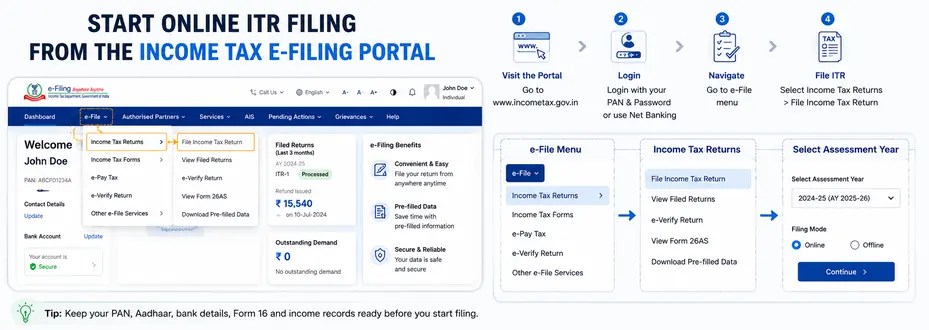
Next, select the assessment year for which you are filing the return and choose Online as the filing mode. For example, the Income Tax Department's current guidance shows AY 2026-27 for returns relating to income earned during FY 2025-26.
The correct ITR form depends on your income sources and tax circumstances, so do not select a form simply because it is commonly used.
| ITR Form | Broad applicability |
|---|---|
| ITR-1 | Eligible resident individuals with qualifying income within prescribed limits |
| ITR-2 | Individuals/HUFs without business or professional income who are not eligible for ITR-1 |
| ITR-3 | Individuals/HUFs having applicable business or professional income |
| ITR-4 | Eligible resident individuals/HUFs/firms using applicable presumptive taxation provisions |
These descriptions are simplified; eligibility conditions and exclusions apply. The Income Tax Department's current guidance provides the detailed eligibility requirements for each form.
After selecting the applicable return, review the information already available in the form. Pre-filled information should be verified rather than accepted automatically.
For example, check your personal information, salary, TDS, bank details, and other income-related information against your own records and available tax statements.
Then, enter or confirm the applicable income, deductions, tax payments, and other requested information. The exact fields depend on the ITR form and your individual circumstances.
At this stage, accuracy is more important than speed. Missing an income source or entering an incorrect deduction can affect the tax calculation and may require corrective action later.
Next, review the return's calculated tax liability, refund, or amount payable, as applicable. Check the underlying income and tax details if the result appears different from your own calculation.
If additional tax is payable, follow the applicable payment instructions before completing the return. Do not assume that a particular tax result is correct without reviewing the underlying figures.
After reviewing the complete return, submit it through the portal. Before selecting the final submission option, check your personal details, income, deductions, tax payments, bank information, and contact details.
The Income Tax Department provides online filing instructions for individual forms through its e-Filing help resources.
E-verification is the process used to electronically verify a submitted ITR. The Income Tax Department currently provides several verification methods, including Aadhaar OTP, Electronic Verification Code through eligible bank or demat accounts, net banking, and Digital Signature Certificate where applicable.
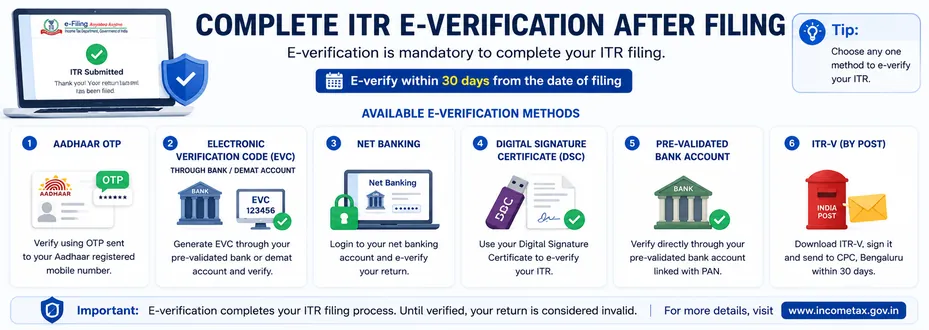
After submitting an ITR online, you should complete the applicable e-verification process to complete the return filing. The Income Tax Department states that the time limit for e-verification or submission of ITR-V is generally 30 days from filing, subject to the applicable rules and circumstances.
After filing an ITR, confirm that the return has been successfully verified and save the acknowledgement for your records. You can also monitor the return's processing or refund status through the applicable Income Tax Department services.
For example, if you discover an issue after submission, do not simply ignore it; first determine whether the applicable rules provide a mechanism to correct the return or address the issue.
Common ITR filing mistakes include selecting an incorrect form, missing an income source, entering inaccurate bank details, claiming deductions incorrectly, and forgetting e-verification.
For example, a taxpayer may reconcile salary and TDS correctly but overlook interest income from a bank account. Reviewing AIS/TIS, Form 16, bank records, and other relevant documents together can reduce this type of error.
If your income involves complex capital gains, business or professional income, foreign assets, or other specialized circumstances, verify the applicable rules before filing. NRI taxpayers should also follow the rules applicable to their residential status; see our guide on How to File ITR for NRI for that separate topic.
The Income Tax e-Filing portal is the primary platform for submitting an online ITR, while AIS/TIS and your personal financial records can help you review relevant tax information. The official portal also provides filing manuals and return utilities for applicable forms.
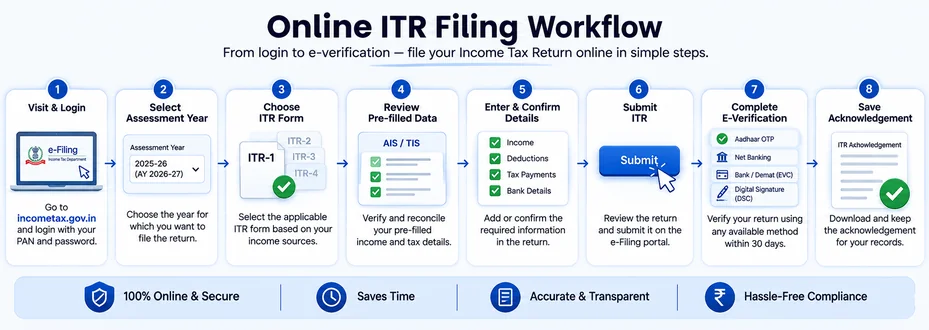
For a straightforward example, a salaried individual can gather Form 16 and other income records, review AIS/TIS, select the applicable ITR form, confirm the pre-filled information, review the tax computation, submit the return, and complete e-verification.
After filing your ITR, save the acknowledgement and keep your supporting records available. You should also monitor the return status and respond appropriately if the Income Tax Department raises a communication or requires additional action.
For future filings, maintaining organized records throughout the financial year can make the next return easier to prepare. Keep documents such as salary records, investment statements, tax certificates, and relevant financial records in an accessible location.
Filing ITR online is a structured process that starts with preparing your records and selecting the correct ITR form, followed by reviewing information, submitting the return, and completing e-verification. A careful review before submission is one of the simplest ways to reduce avoidable filing errors.
By following each step in order and using official Income Tax Department guidance when rules or eligibility are unclear, you can approach online ITR filing with greater confidence. For complex tax situations, verify the applicable requirements or seek professional advice before submitting your return.
This article is for general informational purposes only and does not constitute tax, legal, financial, or investment advice. Laws, regulations, rates, and procedures may change over time and may vary based on individual circumstances.
While SaveTaxs makes reasonable efforts to keep the information accurate and up to date, readers should verify applicable rules with official authorities or consult a qualified professional before making decisions based on this information.
Vipul Jain is the Co-Founder of SaveTaxs and a tax expert with experience in Indian and NRI taxation. He advises individuals, NRIs, and businesses on tax filing, tax planning, capital gains, DTAA, and compliance matters. He focuses on making complex tax concepts simple and helping taxpayers make informed, compliant decisions. See Full Bio
Want to read more? Explore Blogs