
NRI Income Tax Compliance

How To Check TAN Application Status Online?

Hatim Dudhiyawala
Updated on: June 1, 20269 mins Editorial Standards
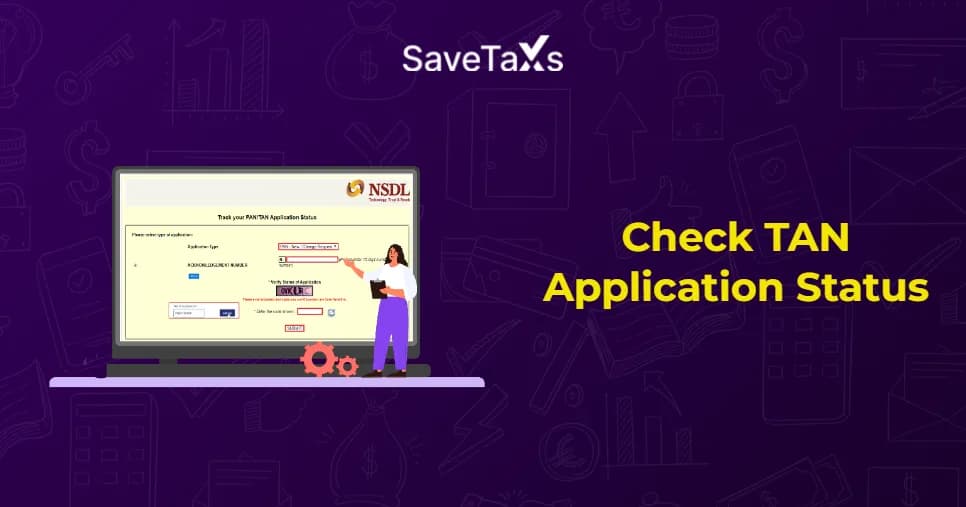
Track TAN application status

As a person or entity responsible for collecting or deducting tax at source, you are required to obtain a tax deduction and collection account number (TAN) under the Income Tax Act. Once you submit the TAN application online, you can easily track its status through various methods, such as customer care services, acknowledgment number, SMS, and more.

Checking the TAN application status time and again will ensure you receive a timely TAN allotment and seamless compliance with TCS and TDS requirements.

In this blog, we will explain how NRIs and residents can track their TAN applications online using the acknowledgment number, customer care number, and SMS services.
Key Takeaways
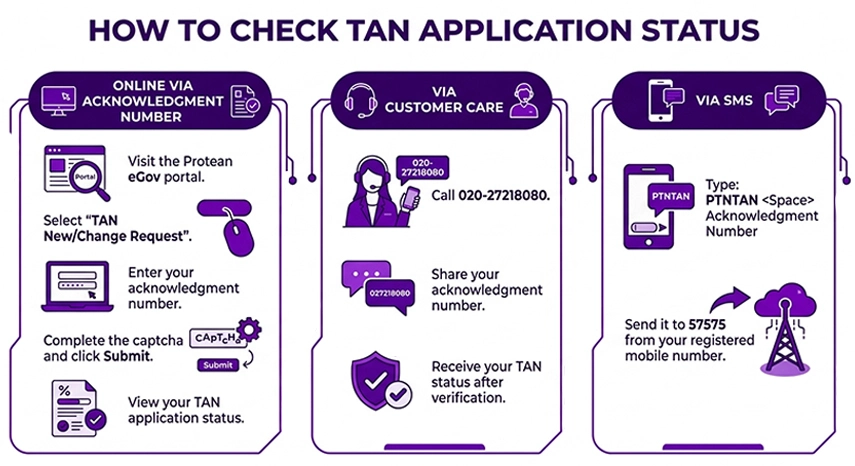
  • A TAN application status can generally be tracked online 3-4 days after submission using the 14-digit acknowledgment number on the Protean (formerly NSDL) portal.
  • Other options to track the TAN application status include calling the customer care number or sending an SMS.
  • While tracking the TAN application status through SMS, you need to use the prescribed format that includes PTNTAN < space> Acknowledgment number. and send the SMS from the registered mobile number.
  • The acknowledgment number is very important for tracking the status of your TAN application; make sure to note it down, as it is displayed after you successfully submit the TAN application.

Check TAN Application Status Online

Check TAN Application Status Online Via Acknowledgment Number

The following are the steps to check your TAN application status via acknowledgment number:

  • Step 1: Visit the Protean eGov Portal.
  • Step 2: Against the application type, you will find a drop-down menu. Select "TAN New/Change Request".
  • Step 3: Select the option "Acknowledgment Number" and then enter your acknowledgment number in the space provided.
  • Step 4: Enter the captcha code in the space provided, then click "Submit".
  • Step 5: After clicking the Submit button, the status of your TAN application will be displayed on the screen.

Check TAN Application Status Via Customer Care Number

Once you successfully file your TAN application, you can also check its status by calling the customer care number. The applicant can call 020-27218080 and provide the details requested by the executive who answers the call. Post verification, the executive will update you on the status of your TAN application

File your NRI ITR with 100% Accuracy

With Savetaxs, get personalized tax services from our experts and file your taxes on time with 100% accuracy.

Check TAN Application Status Via SMS

Once you have successfully filed your TAN application, you can check its status via SMS. To do so, send an SMS to 57575 in the following format.

PTNTAN < space> Acknowledgment Number. Ensure to send the SMS from your registered mobile number.

TAN Application Status Messages - What Do They Mean?

When you check your TAN status, you will see these messages. Here is what each message exactly means.

  • TAN Under Process: This means your TAN application has been received and is currently under review. This status is normal during the first few working days, and no action is needed on your end unless the application status remains the same for more than 10-12 working days.
  • TAN Allotted: This means the TAN has been successfully issued to you, and you will receive the TAN certificate by post to the address you provided, generally within 7-10 working days after allotment. Furthermore, you can also download a soft copy from the NSDL portal using your acknowledgment number. If you need the TAN urgently before your physical card arrives, the allotted number is already visible on the status pages, and it is valid and can be used immediately.
  • TAN Rejected or Put on Hold: This generally indicates a problem with your TAN application, such as missing documents, mismatched information, or a processing issue. However, the report will show a brief reason for the rejection alongside the statements. If your application is rejected or put on hold, please read the next section carefully.

Common Reasons Behind TAN Application Delay Or Rejection

The following are the common reasons behind your TAN application delay or rejection.

Common Reasons Behind TAN Application

  • Incorrect PAN Card Details: The PAN details you entered may not match the Income Tax Department's records.
  • Address mismatch: The address on your application generally does not match the identity proof.
  • Incomplete or Unclear Documents: Blurry scans, missing signatures, or the wrong document type submitted.
  • Wrong Category Selected: Individuals, companies, trusts, and other entities may have different application requirements, and selecting the wrong category can lead to processing issues.
  • Payment not processed- Application fee payment failed, or it wasn't linked correctly.
  • Duplicate Application- A TAN already exists for your PAN; you cannot hold two TANs.

Specifically for NRIs, a common issue is submitting foreign address proof when Indian address proof is required, or vice versa, depending on the applicant's category.

What To Do If My TAN Application Is Rejected

The rejection of your TAN does not mean you cannot get your TAN number allotted. You can reapply with corrected details, and here's how to handle it cleanly.

  • Step 1: Read the reason for rejection carefully because the NSDL portal generally specifies the exact issue. Understand the issue and note it down.
  • Step 2: Gather the correct documents. If the application was rejected due to document issues, ensure your identity proof, address proof, and supporting documents are all valid, legible, and consistent with each other.
  • Step 3: Submit a fresh application. Visit https://www.tin-nsdl.com, fill in Form No. 134 & 135 (Earlier Form No. 49B) again with the corrected details, and then pay the application fees.
  • Step 4: Double-check before submitting. Verify that your PAN, name spelling, and address exactly match your supporting documents, as even a small mismatch can cause rejection.
  • Step 5: Track the new acknowledgment number. Once you have resubmitted the application, you will receive a new 15-digit acknowledgment number. Use it to track the fresh application.

If you are unsure why your application is being rejected or your reapplication is being delayed again, it is worth consulting a CA or a tax professional, especially for business entities, trusts, or NRI applicants, for whom documentation requirements are stricter.

Confused About TAN Application?

Connect with Savetaxs, and we will help you consult on the TAN application end-to-end.

Consult Now

The Bottom Line

For applicants filing TAN applications, the acknowledgment number is very important for tracking your application status. Hence, ensure to note it somewhere. The acknowledgment number is displayed after the application has been submitted. The applicant can use any of the three TAN status tracking methods mentioned above.

As an NRI, if you are planning to apply for your TAN and need expert support, Savetaxs is the name to trust. Experts help NRIs with application processing, including filling out and reviewing the TAN application form for accuracy and ensuring no mistakes are made before submission. The experts will actively track your TAN application online and keep you updated. Additionally, the expert will help you with documentation, tax compliance support, and more.

Connect with us as we serve our clients 24/7 across all time zones.

Note: This guide is for information purposes only. The views expressed in this guide are personal and do not constitute the views of Savetaxs. Savetaxs or the author will not be responsible for any direct or indirect loss incurred by the reader for taking any decision based on the information or the contents. It is advisable to consult either a CA, CS, CPA or a professional tax expert from the Savetaxs team, as they are familiar with the current regulations and help you make accurate decisions and maintain accuracy throughout the whole process.

About Author
Hatim Dudhiyawala
Hatim Dudhiyawala Certified Public Accountant (CPA)

Hatim Dudhiyawala is a Certified Public Accountant (CPA) with SaveTaxs and specializes in Indian and NRI taxation. He advises individuals, NRIs, and businesses on income tax filing, capital gains taxation, DTAA benefits, fund repatriation, and tax compliance. With experience in cross-border tax matters, Hatim helps taxpayers understand complex regulations and make informed decisions. Through his articles, he shares practical insights to help readers stay compliant and manage their tax obligations with confidence. See Full Bio

Recent Post

Want to read more? Explore Blogs

Frequently Asked Questions

TAN is mandatory for persons and entities responsible for collecting or deducting tax at source. TAN can be obtained by applying online via the NSDL TIN portal.

For the TAN to be allotted, it generally takes 7-15 working days from the date of successful application and document verification. However, the time varies depending on the processing requirements.

The following are the steps to download a TAN allotment letter

  • Go to the NSDL TIN portal
  • Enter the acknowledgment number and the displayed captcha.
  • Click on the "Submit and view status". The TAN status will be displayed on the screen.
  • Now, click the download link to download your TAN certificate.

No. The acknowledgment number is the primary piece of information every applicant needs to track the status of their TAN application online. In case you have misplaced your acknowledgment number, you can call the TAN call center for further assistance.

To check your TAN application status online, visit the NSDL Protean website and enter the 14-digit acknowledgment number you received when submitting your TAN application.