Checking the PAN card's active status is important for businesses and individuals to enjoy seamless operations. An active PAN (Permanent Account Number) is crucial for accessing financial services and avoiding legal issues. Conversely, an inactive PAN can cause several difficulties, like penalties and restrictions in making various financial transactions and tax filing. You can check your PAN card's active status on the official Income Tax portal. Keep reading further to know more about what the PAN card's active or inactive status means and how to check the same.
Key Takeaways
- You can check your PAN card's active or inactive status online on the Income Tax portal using your PAN number and registered mobile number.
- You will be restricted from carrying out various financial transactions if your PAN card is inactive.
- Send an application to the jurisdictional AO requesting that your PAN be activated if your PAN is deactivated for any reason except PAN-Aadhaar linking.
- If the PAN is inoperative due to not linking the PAN Aadhaar, you can get it activated by applying for linking it and paying the penalty of Rs. 1,000.
How to Check PAN Active Status?
You will need your PAN number and a valid mobile number linked to your PAN for OTP verification to check your PAN card's active status. Follow the steps below to verify your PAN card or check if your PAN card is active or inactive:
- Step 1: Visit the income tax e-filing website.
- Step 2: On the homepage, under the 'Quick Links' heading, click on the 'Verify PAN Status' option.
- Step 3: Provide your PAN number, name, date of birth, and mobile number.
- Step 4: Click on the 'Continue' button.
- Step 5: You will receive an OTP on your registered mobile number. Enter it and click on the 'Validate' button.
- Step 6: The status of the PAN card will be displayed on the screen, stating whether it is active or inactive.
What are the Reasons for PAN Card Deactivation?
The Income Tax Department may mark your PAN card as inoperative or deactivated for the following reasons:
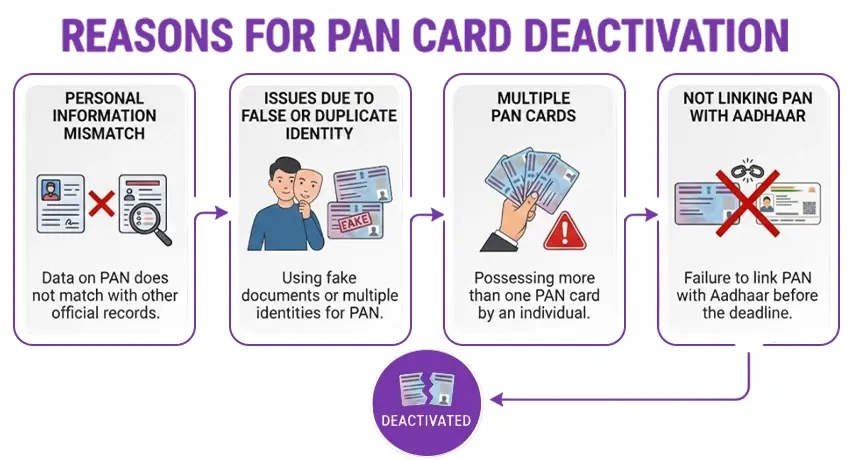
- Personal Information Mismatch: If there are inconsistencies between your PAN and Aadhaar details, your PAN may be flagged and become inoperative.
- Issues due to False or Duplicate Identity: PAN cards given based on fake documents or incorrect personal details will be marked as invalid and deactivated.
- Multiple PAN Cards: Having more than one PAN card is against the Income Tax Act. Any extra PAN card(s) will be deactivated.
- Not linking PAN with Aadhaar: It's mandatory to link your PAN with your Aadhaar as per the CBDT notification. Not doing this results in your PAN being inactive.
What Happens If Your PAN Card Becomes Inoperative?
If your PAN card is inoperative, your ability to conduct the following financial transactions will be restricted:
- Applying for credit or debit cards
- Prohibited from submitting Forms 15G/15H
- Opening an account (except for certain basic types) with a bank or cooperative bank.
- Opening a demat account with a participant, depository, or custodian of securities
- Financial transaction restrictions like opening bank accounts, cash deposits, securities, and the sale of property
- Making cash payments over Rs. 50,000 for specified purposes like hotel bills, foreign travel, mutual fund unit purchases, and more
- Depositing more than Rs. 50,000 in cash in a single day to a banking company or a cooperative bank
- Payment of an amount to an insurer for life insurance premiums aggregating to more than Rs. 50,000 in a financial year
- Opening a time deposit that goes above Rs. 50,000 or aggregates to more than Rs. 5 lakh during a financial year with a bank company, post office, a co-operative bank, NBFC, or a Nidhi registered under the Companies Act, 2013
- Purchase of bank drafts, banker's cheque, or pay orders from a banking company or cooperative bank exceeding the payment of Rs. 50,000 in cash in a single day.
- Selling or purchasing shares of a company that isn't listed on any recognised stock exchange, exceeding Rs. 1 lakh per transaction.
- Payment made to one or more prepaid payment instruments to a banking company, a co-operative bank, or to another institution or company in cash, bank draft, pay order, or banker's cheque of an amount aggregating to more than Rs. 50,000 in a financial year
When your PAN is inoperative, a higher rate of tax will be deducted for the following financial transactions:
- Buying or selling a vehicle (other than a two-wheeler vehicle)
- Purchase or sale of goods or services worth more than Rs. 2 lakh in a single transaction
- Purchase or sale of an immovable property exceeding Rs. 10 lakh or valued by a stamp valuation authority where the amount goes beyond Rs. 10 lakh
Get Expert Help for Your PAN Card
Resolve your PAN card issues with expert assistance at Savetaxs.
What to Do If Your PAN is Deactivated?
If your PAN card is deactivated (for reasons other than not linking it to Aadhaar), you will need to write a letter to your jurisdictional Assessing Officer (AO) requesting that your PAN card be activated. You must include these documents along with your letter:
- An indemnity bond in favor of the Income Tax Department
- A copy of your PAN used for filing your Income Tax Returns
- Copies of your income tax returns from the last three years from the deactivated PAN number
Once the AO receives your request and verifies it, your PAN card should be activated within 15-30 days.
How to Link PAN with Aadhaar?
If your PAN is inoperative due to not being linked to Aadhaar, you can get it activated again by applying to link it, which requires a penalty of Rs. 1,000. The PAN will become operative 30 days after the application. Here's how to link your PAN with Aadhaar:
- Step 1: Visit the official Income Tax e-filing website.
- Step 2: On the homepage, under the 'Quick Links' section, click on the 'e-pay tax' option.
- Step 3: Enter your PAN and mobile number, then click 'Continue'.
- Step 4: Enter the received OTP and click on the 'Continue' button.
- Step 5: Under the ''Income Tax' button, click on the 'Proceed' button.
- Step 6: Choose the assessment year as '2025-26', payment type (minor head) as 'Other Receipts (500)'.
- Step 7: Click on 'Continue' to pay the penalty. Once the payment is done, go to the homepage and click on the 'Link Aadhaar ' option.
- Step 8: Enter the PAN and Aadhaar number and click on 'Validate'. Enter your name, mobile number, and click on the 'Link Aadhaar' button.
- Step 9: Provide the received OTP and click on the 'Validate' button. Your request for PAN-Aadhaar linking will be sent to the UIDAI.
How to Check the Status for PAN-Aadhaar Linking?
Follow the steps below to check if your PAN is linked to your Aadhaar card:
- Step 1: Visit the Income Tax e-filing website.
- Step 2: On the homepage, under the 'quick links' heading, click on the 'Link Aadhaar status' option.
- Step 3: Enter your PAN and Aadhaar card number and click on the 'View Link Aadhaar status' option.
- Step 4: The status of your PAN-Aadhaar link will be displayed on the screen.
Remote PAN Card Assistance for NRIs
NRIs can now apply for a PAN card entirely online and remotely through Savetaxs, no matter where they are located.
Final Thoughts
You can check your PAN card's active or inactive status on the official income tax e-filing website. Your PAN card may be inoperative due to various reasons. Now, if your PAN is inoperative due to any reason except PAN-Aadhaar not linking, request your jurisdictional AO in the Income Tax department to activate your PAN card. However, if your PAN is inactive or inoperative because your PAN is not linked to your Aadhaar card, you can send a request to link your PAN-Aadhaar after paying the penalty amount. The PAN will be operative again within 30 days.
Additionally, to ensure compliance with the latest rules and easily understand your PAN card's active or inactive status, consulting an expert may be beneficial. When talking about experts, Savetaxs is the name to trust. We provide PAN Card Services through a team of professionals who have been helping NRIs for more than two decades with their PAN card issues. Connect with our team right away, and we will ensure to stay connected with you throughout the process while providing end-to-end guidance.



_1768893982.webp&w=3840&q=75)
_1780641850455.webp&w=828&q=75)
_1780465430494.webp&w=828&q=75)
_1780318424443.webp&w=828&q=75)