NRI Income Tax Compliance
How to Claim Excess TDS Refund After Selling Property in India as an NRIHow to Claim Excess TDS Refund After Selling Property in India as an NRI
Written by Shubham Jain
Income tax refund showing credited on the CPC portal, but you have not received the amount in your bank account? Don't get confused. A refund credited but not reflected in your bank account may occur for several reasons. Understanding the reasons helps you identify whether the problem lies with the banking network, Income Tax Department, or the registered account.
Want to know why the ITR refund credited but not reflected, and what you should do in this situation? Well, then you are on the right page. Read the blog and get your answers.
A mismatch between the bank updates and CPC records often creates confusion. When the Centralized Processing Centre marked the refund as "credited," but it does not reflect in your bank statement, it may be because of several reasons. It includes processing errors, banking delays, incorrect bank details, or a refund applied against your outstanding Tax Demand.
Additionally, CPC processing relies on the bank information available on the income tax e-filing portal. So, even if one element, like account number, PAN linkage, IFSC, or account status, is incorrect, the tax refund may not be shown in your account even after it is processed by the CPC.
This was all about an income tax refund showing credited, but not reflected in your bank account. Moving ahead, let's know the common reasons for not showing the refund in the bank account.
The common reasons for a refund credited but not reflected in the bank account are as follows:
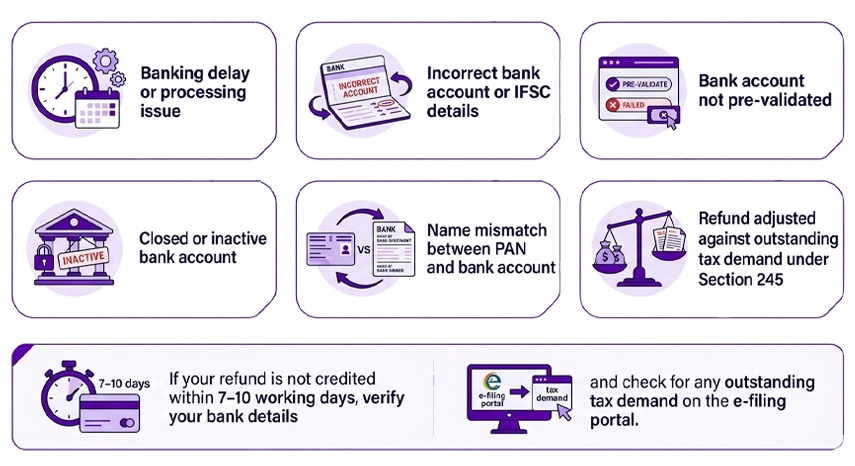
Once the Income Tax Department releases your refund, it is generally credited through ECS (Electronic Clearing Service) or other approved banking channels. From the date shown on the income tax e-filing portal, this transfer generally takes 3 to 5 working days.
If it is less than 7 days since the CPC portal updated its status to "Refund Credited," wait it out. Depending on the bank type, the processing time varies. Additionally, some banks, such as those with older banking systems or smaller cooperative banks, take time to review the credit amount. In case it is more than 10 working days, and the amount is still not credited, it can be another reason.
It is the most common reason for an ITR refund was deposited but not received in the bank account. The ITR refund may have been sent to:
Considering this, when the bank account details are incorrect, the ECS transfer may get returned or fail, and the portal still shows "Refund Credited" even though it didn't actually go through. In such scenarios, once the return is confirmed, the status is updated to "Refund Failed."
To check it out, log in to the incometax.gov.in and go to the "My Profile" section. Under the "Bank Account" section, check your bank details. After that, confirm your account number, IFSC code, and name. In case the account is not pre-validated or shows a failed validation status, you got your answer.
To fix it, pre-validate the correct bank account and submit a refund reissue request if required. Additionally, through the portal, request a refund reissue using Services → Refund Reissue.
In case, from a previous assessment year, you have an unpaid tax demand linked to your PAN. In this scenario, the Income Tax Department, under section 245 of the Income Tax Act, can apply your refund against the tax demand either fully or partially.
When this type of situation happens, from the department's side, the portal shows the refund as processed. However, you did not receive the amount in your account as it was internally offset.
Under section 245, before making this adjustment, the income tax department sends you an intimation, giving you a chance to contest or agree. To know whether you received this notice or not, check your registered email or e-filing portal inbox. If you received the notice and did not respond to it, the adjustment may be processed in accordance with the applicable provisions.
If you believe the outstanding demand is already paid or incorrect, you can raise a grievance or file a rectification request on the portal. Additionally, it is advisable not to ignore it, as if left unresolved, the old tax demands can continue to impact your future refunds, too.
These are some of the key reasons for the ITR refund credited but not reflected in your bank account. Moving further, let's know what to do if the refund is credited but not reflected in your bank account.
Under the expert guidance of Savetaxs, fulfill your tax obligations with complete accuracy and maximize your refund.
Follow the steps below if the ITR refund credited but not reflected in your bank account:
This is what you should do if the ITR refund credited but not reflected in your bank account. Moving forward, let's know the reasons why NRIs face Income Tax Refund delays in India.
Here are some of the key reasons why NRIs may face ITR refund credit delays:
So, these are some of the key reasons why NRIs may face refund credit delays.
At Savetaxs, from tax planning to ITR filing and tax deduction, experts handle everything on your behalf.
Lastly, the issue of the ITR refund credited but not reflected generally arises from bank detail errors, processing errors, or refund adjustment against outstanding tax demand. Ensuring updated information on the tax portal and requesting a refund reissue helps in swiftly resolving the issue.
Furthermore, if you are looking for NRI tax assistance, connect with Savetaxs. We have a team of tax experts with years of knowledge in cross-border taxation. With us by your side, you can simply fulfill your tax obligations on time with full accuracy.
This article is for general informational purposes only and does not constitute tax, legal, financial, or investment advice. Laws, regulations, rates, and procedures may change over time and may vary based on individual circumstances.
While SaveTaxs makes reasonable efforts to keep the information accurate and up to date, readers should verify applicable rules with official authorities or consult a qualified professional before making decisions based on this information.
Vipul Jain is the Co-Founder of SaveTaxs and a tax expert with experience in Indian and NRI taxation. He advises individuals, NRIs, and businesses on tax filing, tax planning, capital gains, DTAA, and compliance matters. He focuses on making complex tax concepts simple and helping taxpayers make informed, compliant decisions. See Full Bio
Want to read more? Explore Blogs