NRI Income Tax Compliance

ITR Validation Errors: How to Resolve Validation Errors in ITR?

Hatim Dudhiyawala
Updated on: May 26, 20269 mins Editorial Standards
ITR validation errors

When filing ITR, if it gets rejected due to a validation error, then don't panic, as you are not alone. While filing income tax returns in India, many taxpayers, whether resident or an NRI, often face ITR validation errors, which can be daunting. These errors occur due to incomplete details, data mismatches, or incorrect form usage during e-filing. To maintain accuracy and compliance, the system of the Income Tax Department automatically flags such inconsistencies.

Considering this, it is vital to understand these validations, and knowing how to fix them helps in preventing refund issues, delays, or notices. To help you out, this blog provides you with complete information about ITR validation errors and how to resolve them. So stay tuned and gather all the details.

Key Takeaways
  • ITR validation errors occur when the information submitted in your return does not match the records available with the Income Tax Department or when required details are incomplete or incorrect, for instance, a mismatch in PAN/Aadhaar details.
  • Before filing your return, ensure that your contact details and bank accounts are pre-validated on the e-filing portal of Income Tax.
  • According to your income type and source, choose the correct ITR form.
  • Your income and tax credits should match your Form 26AS and AIS.
  • After filing your ITR return, if you notice an error, under section 139(5) of the Income Tax Act, you can file a revised return.

What is a Validation Error in ITR?

Generally, a validation error in ITR occurs when the income tax e-filing system detects missing details or inconsistencies in your returns. Not always are these errors technical; they often arise from mismatched income details, wrong data entry, or not filing the correct ITR form.

In this, the validation process ensures that every ITR return complies with the stated rules of the Income Tax Department. Failure to resolve these errors may lead to refund delays, defective return notices, or processing issues. Identifying and fixing them early makes your ITR process smooth. Additionally, it prevents unnecessary rectification requests and follow-ups later.

This was all about validation errors in ITR. Moving ahead, let's know the common ITR validation errors and how to fix them.

Common ITR Validation Errors and How to Fix Them?

Here are the most common reported ITR validation errors, what they mean, and how to fix them:
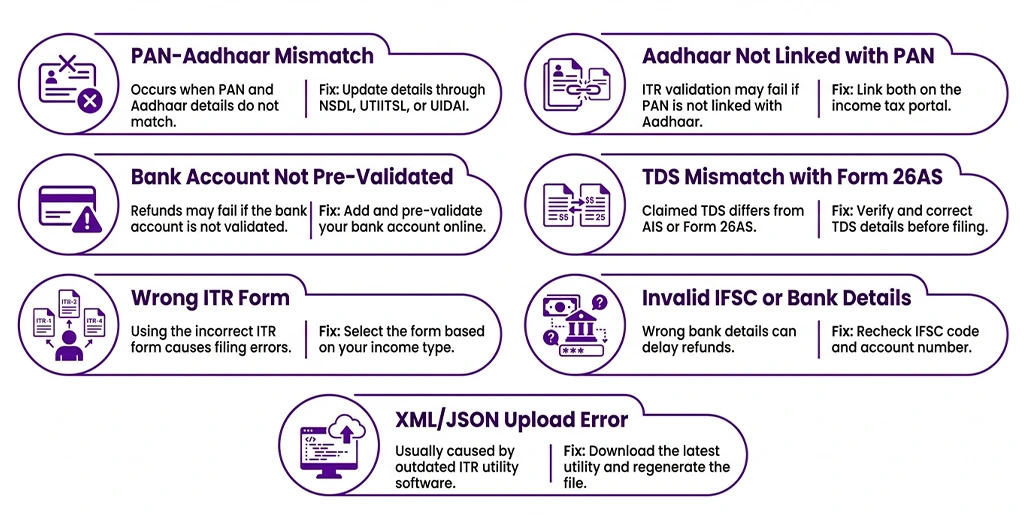
Common ITR Validation Errors

Error 1: PAN Does Not Match Aadhaar Records

This states that your name, date of birth, or gender on your PAN card does not match your Aadhaar card details. Even a small spelling error in this can trigger this mismatch error. To fix it, first you need to identify the information in which there are errors. After that, follow the steps below:

  • Visit the NSDL or UTIITSL portal and apply for a PAN correction option with correct details.
  • You can also update your Aadhaar card details using the UIDAI portal.
  • Once corrected, retry ITR filing after 24 to 48 hours.

Error 2: Aadhaar Not Linked to PAN

Taxpayers need to link their Aadhaar card with their PAN card. If you have not linked your PAN with Aadhaar, your ITR return validation may fail. Considering this, NRIs who do not hold an Aadhaar card are exempt from this requirement. To avoid errors, they should clearly mention this in their ITR return.

Furthermore, visit the incometax.gov.in website and under the "Quick Link" section, link your PAN and Aadhaar card. Additionally, pay the applicable fee.

Error 3: Bank Account Not Pre-Validated

This means the bank account you mentioned for the tax refund is not verified on the income tax e-filing portal, and because of this, it will not clear the validation check. To fix it, follow the steps below:

  • Visit the incometax.gov.in website.
  • Go to my profile section and then my bank accounts.
  • Add your bank account and complete the pre-validation process.
  • In 1 to 2 working days, the validation process will be completed.

Furthermore, for Indian tax refunds, NRIs should use their NRO account.

Minimize Errors and Maximize Your ITR Refund

Connect with Savetaxs and fulfill your NRI tax obligations without any mistakes.

Error 4: TDS Mismatch with Form 26AS

This error occurs when your claimed TDS amount does not match the information mentioned in the Form 26AS or Annual Information Statement (AIS). This mismatched information is flagged by the system of the income tax department when you file your ITR. You can fix this by:

  • Downloading your Form 26AS and AIS from the e-filing tax portal.
  • Cross-verify every TDS entry against your actual tax deduction certificates.
  • Correct the figures in your ITR to exactly match Form 26AS.
  • In case you figure out your Form 26AS has an error, you can contact your TDS deductor and ask them to file a TDS correction.

Error 5: Selected the Wrong ITR Form

In India, for a specific income type, there is an ITR form. For NRIs, only ITR-2 (business or professional income) and ITR-3 (salary income, rent, capital gains, or foreign income) are available. Not choosing the correct ITR form as per your income type also creates an error when filing ITR. Considering this, you can fix this:

  • If it has not been verified, delete your filed return or current draft.
  • According to your income type, choose the correct ITR form.
  • Refill your ITR with the correct form.

Error 6: Invalid IFSC or Bank Account Number

Wrong bank account number, IFSC code, or account type also triggers an ITR validation error. This is the most common yet avoidable error. You can fix it:

  • Cross-check your account number and IFSC code directly from your bank statement or passbook.
  • Update the correct details in your ITR return before submission.
  • Ensure the bank account is in your name and is active.

Error 7: XML or JSON File Error During Upload

NRIs who file ITR offline using the download utility should upload a JSON or XML file to the income tax portal. If this file is generated from an outdated utility or is not compatible with the current portal format, it will create an error. You can fix this by:

  • From the e-filing portal, download the latest version of the ITR utility form.
  • Using the updated utility, regenerate your XML or JSON file.
  • After that, clear your browser cache and re-upload the file.

These are some of the most common ITR validation errors and how you can fix them. Considering this, some other errors resulting in ITR validation include:

  • Your name does not match your PAN database.
  • Mismatch of DOB for senior citizen benefits.
  • As per section 142(1), filing a revised ITR return when it is not valid.

Carefully cross-checking the filled details and ensuring all the mandatory fields are completed can help in avoiding these errors. Additionally, you can also avoid ITR validation errors by not using special characters and checking your internet connection and software settings. Moving further, now let's know the process to resolve ITR validation errors.

Step-by-Step Process to Resolve ITR Validation Errors

Here is the step-by-step process to resolve the ITR validation errors:
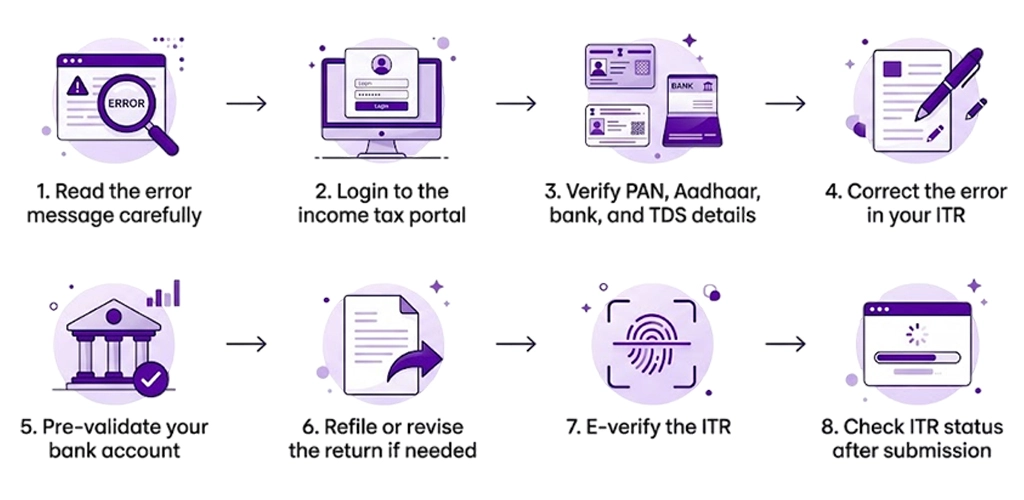
Process to Resolve ITR Validation Errors

  • Step 1: Do not panic, read the error message carefully shown on the portal. This message helps you to know what exactly is wrong with your ITR return, whether it is a bank account issue, PAN mismatch, or more.
  • Step 2: Visit the income tax e-filing portal and use your credentials (PAN number and password) to log in to the site. Move to the e-file section and open your drafted or filed return to see the complete error details.
  • Step 3: Before making any corrections, cross-check all your submitted documents. Additionally, keep the following documents by your side:
    • PAN card
    • Aadhaar card
    • Form 16 or salary certificate
    • Bank account statement or passbook
    • Form 26AS and AIS downloaded from the portal
    • All TDS certificates
  • Step 4: According to your error type, make the specific correction. Do not unnecessarily change any other detail in your ITR return.
  • Step 5: If the ITR validation is associated with your bank account, under My Bank Accounts in your profile, complete the pre-validation process. It should be done before your ITR submission.
  • Step 6: After making corrections in your ITR return, submit it again. In case your original ITR return was already submitted and verified, then under section 139 (5) of the Income Tax Act, you need to file a revised return. You can file the revised return at any time before the end of the relevant assessment year or before the assessment year is completed, whichever is earlier. 
  • Step 7: Always e-verify your ITR return. It is because an unverified ITR is treated as if it were never filed. You can e-verify it through:
  • Step 8: After 48 hours of filing your ITR return, check its status. If all ITR validation errors are resolved, it will show successfully submitted.

This is how you can resolve the ITR validation errors. Moving forward, let's know the things you should consider when filing an ITR as an NRI.

Quick Checklist: Before You File Your ITR as an NRI

Follow the checklist below to avoid ITR validation errors:

  • Match your PAN and Aadhaar details correctly.
  • If applicable, link your PAN with Aadhaar on the portal or ensure your NRI status is correctly reflected.
  • Have a pre-validated bank account on the e-filing tax portal.
  • Select the correct ITR form according to your income type.
  • Account number and IFSC code verified from your bank account.
  • TDS amount should match AIS and Form 26AS.
  • If claiming DTAA benefits, have a tax residency certificate.
  • If filing online, download the latest ITR utility.
  • After submission, e-verify your return.

Considering the above checklist will surely help you in avoiding ITR validation errors in India.

Facing Issues with Your Tax Obligations?

At Savetaxs, get expert assistance and resolve your tax issues in minutes.

Get Started!

Final Thoughts

Lastly, ITR validation errors are common, but you can manage them by giving proper attention to details. Determining the cause, following portal prompts, and re-verifying provides you with a quick resolution. Additionally, to minimize your errors, cross-check your income figures, verify your documents, and validate bank accounts.

Furthermore, being an NRI, if you are facing issues in managing your tax obligations in India, connect with Savetaxs. We have a team of financial experts who provide personalized guidance as per your tax situation and help with tax planning in India. You can contact us anytime; we are 24/7 available to assist you.

Note: This guide is for information purposes only. The views expressed in this guide are personal and do not constitute the views of Savetaxs. Savetaxs or the author will not be responsible for any direct or indirect loss incurred by the reader for taking any decision based on the information or the contents. It is advisable to consult either a CA, CS, CPA or a professional tax expert from the Savetaxs team, as they are familiar with the current regulations and help you make accurate decisions and maintain accuracy throughout the whole process.

About Author
Hatim Dudhiyawala
Hatim Dudhiyawala Certified Public Accountant (CPA)

Hatim Dudhiyawala is a Certified Public Accountant (CPA) with SaveTaxs and specializes in Indian and NRI taxation. He advises individuals, NRIs, and businesses on income tax filing, capital gains taxation, DTAA benefits, fund repatriation, and tax compliance. With experience in cross-border tax matters, Hatim helps taxpayers understand complex regulations and make informed decisions. Through his articles, he shares practical insights to help readers stay compliant and manage their tax obligations with confidence. See Full Bio

FREE Assistance
NRI Tax Consultation

Get expert assistance with ITR filing, DTAA benefits, and tax compliance in India.

Get Assistance
source bage
Recent Post

Want to read more? Explore Blogs

Frequently Asked Questions

The choice depends on your tax situation. If you have a simple salaried income, online ITR filing platforms are affordable, faster, and more convenient. In contrast, if you have complex financials like freelance income, multiple properties, or business/capital gains, a CA is better. However, now the complex tax situation can also be easily handled on modern online tax filing platforms, as they have in-house CAs in their team.

Yes, online platforms handle complex ITR cases like CA through their "CA-assisted" or "expert-assisted" plans.

Yes, a business owner can file ITR through an online platform using the official government portal or any approved e-filing platforms from the comfort of their home.

Getting an income tax notice after filing online does not mean you are in trouble. It generally means the Income Tax Department needs your clarification on your tax filings, wants to check your tax deduction, or has found a mismatch of income with your ITR and AIS.

Yes, almost all major Indian ITR filing platforms provide paid CA-assisted plans where a CA reviews your data, provides tax planning, and helps you file your returns on time without any errors.