



NRI Income Tax Compliance
How to Claim Excess TDS Refund After Selling Property in India as an NRIHow to Claim Excess TDS Refund After Selling Property in India as an NRI
Written by Shubham Jain
_1767780160.webp&w=3840&q=75)
Tax Deducted at Source (TDS) Challan is the form used to deposit the TDS or Tax Collected at Source (TCS) to the Government. The aim behind its introduction is to manage human errors and online transactions of tax collection, deposit, and refund.
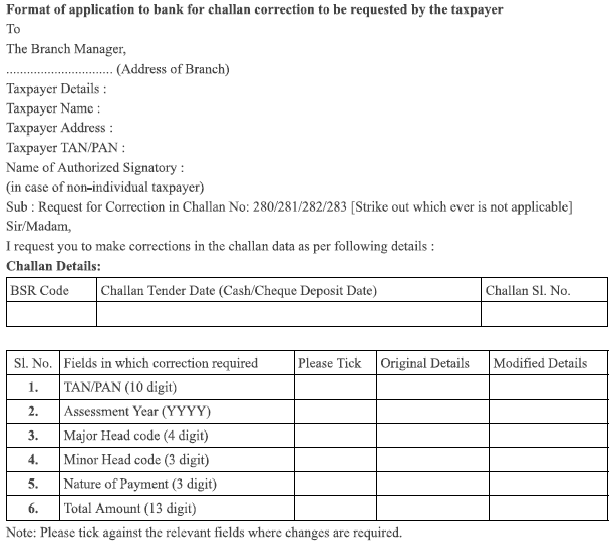
Suppose you have deposited the TDS into the Central Government's account, but you find that you made an unintentional error while paying it, like providing the wrong amount, PAN, TAN, or selecting the wrong major head code, etc. Also, your challan is already generated, then in such situations, the errors attract the situation of no tax credit for the deductee. Additionally, for NRIs, only the deductor (buyer, tenant, or employer holding the TAN) can initiate the TDS challan correction. The NRI must coordinate with the deductor or take professional assistance.
The tax department understands that such minor mistakes can't be avoided. Hence, they provided a mechanism to rectify such errors, which is called Challan correction. It can be done either online or offline. Keep reading further to know more about the process to correct mistakes in the TDS challan.
For payments carried out on or after the 1st of September, 2011, a new challan correction method was laid down for the corrections of physical challans. The table below lists the challan corrections that can be made, along with the name of the authority that is responsible for making such corrections:
| Fields in which corrections must be carried out | Authority Responsible for Correcting | Time limit for the correction carried out by the bank |
|---|---|---|
| Payment Nature | In case of online challans, the concerned assessing officer is authorised. Conversely, in the case of a physical challan, the collecting bank*/assesing officer is authorised. | Within 3 months of the date of deposit of the challan |
| Minor Head Code | Within 3 months of the date of deposit of the challan | |
| Major Head Code | Within 3 months of the date of deposit of the challan | |
| Total Amount | Within 7 days from the date of deposit of the challan | |
| PAN/TAN | Within 7 days from the date of deposit of the challan | |
| Assessment Year | Within 7 days from the date of deposit of the challan | |
| Name | In both online and physical challan cases, the concerned assessing officer is authorised for rectification. | N/A |
Follow the steps below to connect with the bank for challan correction:
Ensure your ITR filing is smooth, accurate, and optimized for maximum savings with expert-backed assistance
The taxpayer can make a correction request to the concerned assessing officer when their limit to approach the bank for challan correction expires. They can request the officer who is authorized under the OLTAS (Online tax accounting system) application to carry out such a correction in challan data in bona fide cases. Additionally, it allows credit for the paid taxes to the concerned taxpayer. The other steps are the same as approaching a bank, as mentioned above
TRACES (TDS Reconciliation Analysis and Correction Enabling System) must be used to carry out the online correction of the TDS challan for NRIs. To register on TRACES and request a challan correction online, you need a digital signature. Before proceeding with the Online Tax Accounting System or OTLAS correction process, ensure that to have the following prerequisites:
| Requested | When the user submits a request for correction |
|---|---|
| Initiated | The TDS CPC is processing your request |
| Available | The correction request is accepted, and the statement is made available for the correction. You can now make corrections to the statement. Clicking on the hyperlink will take the user to the validation screen. After you click on the request with 'Available' status, the request/statement status will change to 'In Progress.' |
| Failed | The request cannot be made available because of technical issues. The user can resubmit the request for the same details |
| In Progress | User is working on a statement. Clicking on the hyperlink will take you to the validation screen |
| Submitted to Admin User: | Sub-user/ Admin user has submitted a correction statement to the Admin user |
| Processed | The statement has been processed by TDS CPC (either for Form 26AS or for defaults) |
| Rejected | The TDS CPC has rejected the statement after processing. Check the 'Remarks' column to see the reasons behind rejection |
Note:- Incorrect selection of these heads is a major reason for Form 26AS mismatch for NRIs.
Let Savetaxs experts handle your income tax filing from start to finish.
Finding errors in the TDS challan can be upsetting for NRIs, but there are solutions available. You can easily correct these issues and ensure the accuracy of your tax files by staying aware of the kind of corrections that are allowed. Additionally, remember that you need a digital signature to register and correct the TDS challan online.
Furthermore, if you have any more queries, seek advice from an expert at Savetaxs. We have a team of experts carrying years of experience and working 24*7 to guide and assist you with your financial matters and tax obligations. Contact us right away
This article is for general informational purposes only and does not constitute tax, legal, financial, or investment advice. Laws, regulations, rates, and procedures may change over time and may vary based on individual circumstances.
While SaveTaxs makes reasonable efforts to keep the information accurate and up to date, readers should verify applicable rules with official authorities or consult a qualified professional before making decisions based on this information.
Vipul Jain is the Co-Founder of SaveTaxs and a tax expert with experience in Indian and NRI taxation. He advises individuals, NRIs, and businesses on tax filing, tax planning, capital gains, DTAA, and compliance matters. He focuses on making complex tax concepts simple and helping taxpayers make informed, compliant decisions. See Full Bio
Want to read more? Explore Blogs
To correct a challan online via TRACES: