PAN Card

How To Download e-PAN Card For NRIs and Indian Residents

autohr img By Pankaj Shaw | Last Updated : 12 Dec, 2025

Download e-PAN Card For NRIs and Indian Residents

An e-PAN card is the government-approved, valid version of your PAN Card. This electronic version of the card can be used anywhere in place of the physical card.

In India, without a PAN card, you cannot complete any financial activity, such as filing your income tax return, opening a bank account, or applying for a loan. This card is a non-negotiable document for financial transactions, and if you have misplaced it or need it urgently, the PAN card download options let you access your e-PAN in seconds and use it whenever you want.

In this guide, we will discuss how NRIs and Indian residents can download the e-PAN card online within minutes.

Key Takeaways
  • An e-PAN card can be downloaded using either your PAN number ot the acknowledgment number.
  • You can download the e-PAN card via three methods: Protean (formerly known as NSDL), UTIITSL, and the income tax e-filing portal.
  • As the downloaded e-PAN PDF is password-protected, the password for individuals is their DOB, and for entities, it is the date of incorporation in the "DDMMYYY" format. For example, if your date of birth is 5th August 1990, your password would be "05081990".
  • Usually, e-PAN cards are generated and allotted after 15 days of their application. However, the instant e-PAN card will be generated within 10 minutes of the application on the Income Tax website.

What Is An e-PAN Card for NRIs?

An e-PAN Card is an electronic version of the physical NRI PAN card issued by the Income Tax Department of India. This e-PAN version eliminates the stress of losing your PAN card. It can be stored easily and used for identification or KYC, as well as for financial transactions and income tax purposes.

Requirements for Downloading the PAN Card Online

Before you start downloading your PAN card online, make sure you have the following ready to ensure a hassle-free process.

  • PAN Number: You must have your PAN card number to initiate the e-PAN card download process.
  • Aadhaar Number: Your PAN must be linked to Aadhaar for authentication. Now, as an NRI, if you have an Aadhaar and PAN linked, that's good, but if you don't, we have discussed an alternative step in the latter part of the blog for you to get the authentication done without linking PAN and Aadhaar.
  • Mobile Number: Please ensure that the mobile number registered with your Aadhar card is active. If it is not, get it active, because you will receive the authentication OTPs on that number. Additionally, for NRIs, alternative options are discussed in the latter part of the blog.

e-PAN Card Download Methods for NRIs

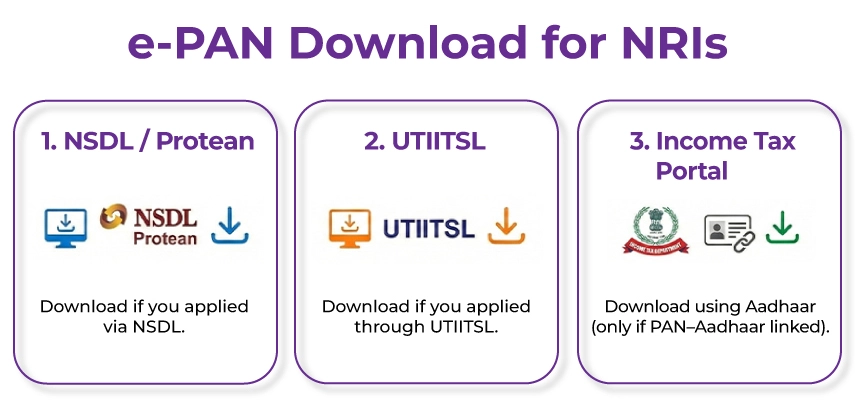
As an NRI, you can access the e-PAN card via three official platforms depending on where your e-PAN application was processed.
e-PAN Card Download Methods

  • NSDL (now known as Protean eGive Technologies) Portal: If your e-PAN card application was submitted via NSDL, you must visit the NSDL e-PAN download page to access your digital PAN card.
  • UTTITSL Portal: If you submitted your e-PAN application via UTTITSL, you can download your e-PAN card from the UTTITSL website. 
  • Income Tax e-filing Portal: Individuals whose Aadhaar and PAN cards are linked can also download their e-PAN via the Income Tax Department e-filing portal using their Aadhaar number.
NRIs PAN application made simple

Secure NRI PAN card with expert NRI tax solutions, ensuring peace of mind.

How To Download the e-PAN Card For NRIs & Indian Residents

To download the e-PAN, Indian residents can follow the steps below. Additionally, NRIs who have their PAN and Aadhaar linked and have their Aadhaar-registered mobile number active, even after moving abroad, can follow this process too.

How To Download An e-PAN Card Via NSDL ( Protean e-Gov)

Step 1: Go to the official NSDL e-Governance website. '

Step 2: On the homepage, navigate to the "Quick Links" section and select 'PAN - New Facilities'. A drop-down menu will appear when clicked.

Step 3: From the drop-down menu, please choose one of the following options based on your application date.

  • Download ePAN/e-PAN XML ( PANs allotted in the last 30 days).
  • Download e-PAN/e-PAN XML ( PANs allotted before 30 days).
  • After choosing, you will be redirected to a new page.

Step 4: Now, on the page you have been redirected to. Choose to proceed using either your PAN card number or the acknowledgment number. Enter all required details, such as the PAN number or acknowledgment number, date of birth, mobile number, and Captcha code.

Step 5: Now click genertae option. Upon clicking, a one-time password ( OTP ) will be sent to your registered mobile number for verification.

Step 6: In the designated field on the page, enter the OTP and click submit. Once verification is successful, you can download your e-PAN card as a PDF.

However, please note that if you Apply for the e-PAN card more than once, a nominal charge may apply.

How to Download an e-PAN Card Through UTIITSL

The following steps show how to download your e-PAN card using the UTIITSL portal.

Step 1: Visit the authorized UTIITSL website.

Step 2: On the home page, go to the PAN Services section, then click "Download e-PAN".

Step 3: Enter the required details, such as your PAN number, date of birth, and GSTIN (if applicable), and double-check all the information before proceeding.

Step 4: Once you have applied, a download link will be sent to your registered mobile number and email address.

Step 5: Then, on the received link, click and follow the on-screen instructions to download your e-PAN card.

Note: If you applied for your PAN in the last 30 days, you can download your e-PAN for free. After 30 days, a fee of Rs 8.26 will be applicable.

How To Download Your e-PAN Card Through the Income Tax e-Filing Portal

The following are the steps to download your e-PAN card via the Income Tax e-filing portal using your Aadhaar.

Step 1: Visit the official Income Tax e-filing website.

Step 2: In the quick links section, select Instant e-PAN.

Step 3: Click on the check status/download PAN, then click the continue button.

Step 4: Then enter your Aadhaar Number and continue.

Step 5: You will then receive a One-Time Password (OTP) on the mobile number linked to your Aadhaar. Enter the OTP in the designated field, then click Continue.

Step 6: Now, if your e-PAN is ready, you will see a "Download e-PAN" button. Click on that button and download your e-PAN in PDF format.

How Can NRIs Download e-PAN Without an Aadhaar OTP?

As mentioned, the e-PAN download process for NRIs and Indian residents is essentially the same. However, when relocating abroad, NRIs have different contact details that may or may not be linked to their PAN or Aadhaar, which affects how they receive the OTP. Because upon moving abroad, NRIs often stop using their Indian mobile number, making it inactive, which is why the OTPs are not accepted.
NRIs Download e-PAN Without an Aadhaar OTP

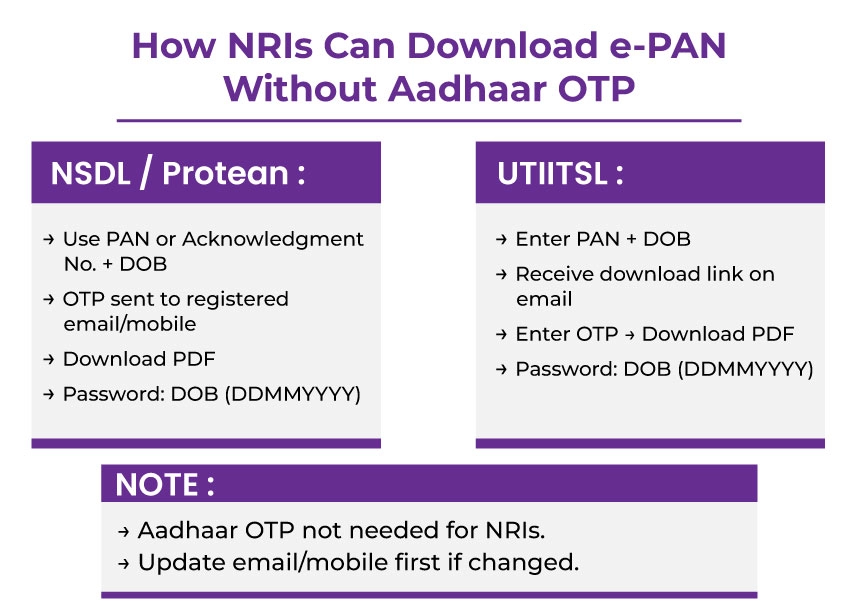
However, NRIs can download their e-PAN card from the NSDL and UTIITSL websites using the PAN number or acknowledgment number and date of birth, without needing an Aadhaar OTP. 

NRIs are usually exempted from linking their PAN and AAdhaar, provided their residential status in the database is correctly updated. 

Steps to Download e-PAN via NSDL/ Protean Portal without an Aadhaar OTP. 

Through this process, the OTP will be sent to the email or mobile number registered during the PAN application. 

Step 1: Visit the official Protean website. 

Step 2: Select either the Acknowledgment Number or the PAN option, depending on whatever details you have handy. 

Step 3: Now enter all the asked details such as your PAN, the 15-digit acknowledgment number, Date of birth, and the Captcha code. 

Step 4: Click Submit

Step 5: When redirected to the next page, select your proposed method to receive the time password. 

Step 6: Tick the declaration box, then click Generate OTP. 

Step 7: Enter the OTP you received and click Validate. 

Step 8: Once validation is complete, you can download the e-PAN in PDF format. However, please note that a nominal fee will apply depending on when you download the e-PAN. Meaning that if you download within 30 days of PAN allotment, it's free, but if you do so after 30 days, a nominal fee applies. 

Step 9: The downloaded file will be secured with a password. The password is your date of birth in the DD/MM/YYYY format. 

Steps to Download e-PAN via UTIITSL Portal

Through this process, you will receive a downloadable link to a document at your registered email address. 

Step 1: Visit the official website of UTIITSL 

Step 2: Click on the "Download e-PAN" tab. 

Step 3: Enter your PAN number, date of birth, and the captcha code. 

Step 4: Click on Submit.

Step 5: You will receive a link to download your e-PAN card, along with an OTP, which will be sent to your registered email ID. 

Step 6: Click the link in the email, enter the OTP, then download the PDF file. 

Step 7: No additional fee will be charged if you download your e-PAN card within 30 days of allotment. 

Step 8: Once the fees are paid, the PDF is downloaded and secured with a password, your date of birth in DDMMYYYY format. 

Please note that if your mobile number or email has changed since the original PAN application, you need to first apply for a correction/change to update your contact details on the relevant portal. Once everything is updated, you can download the ePan card without any hassles. 

The Bottom Line

Downloading e-PAN is now easier than ever for NRIs, whether or not you have an Aadhaar card. Just keep all information on the portal up to date so no last-minute compliance issues arise. Thanks to initiatives by the Indian government, NRIs and Indian residents can now access their e-PAN card anytime, anywhere. 

The confusion between PAN OTP and Aadhaar OTP can overwhelm many NRIs living abroad. Hence, to save you the hassle of navigating the entire process on your own, we are here. Just get in touch with the experts at Savetaxs, and they will do it all for you. 

Savetaxs has been helping NRIs across 90+ countries get their NRI PANs in India. Our experts bring a combined 30 years of experience, so your case is in the hands of trusted professionals. 

Connect with us as we serve our clients 24/7 across all time zones.

Note: This guide is for information purposes only. The views expressed in this guide are personal and do not constitute the views of Savetaxs. Savetaxs or the author will not be responsible for any direct or indirect loss incurred by the reader for taking any decision based on the information or the contents. It is advisable to consult either a CA, CS, CPA or a professional tax expert from the Savetaxs team, as they are familiar with the current regulations and help you make accurate decisions and maintain accuracy throughout the whole process.

profile
Pankaj Shaw (Tax Expert)

Mr Shaw brings 8 years of experience in auditing and taxation. He has a deep understanding of disciplinary regulations and delivers comprehensive auditing services to businesses and individuals. From financial auditing to tax planning, risk assessment, and financial reporting. Mr Shaw's expertise is impeccable.

Recent Post

Want to read more? Explore Blogs

Frequently Asked Questions

No matter what your source of income is, we've got you covered. There’s a plan for everybody!

NRIs can download their e-PAN without an Aadhaar card.

Aadhar specifically for NRIS is not required because:

  • NRIs are not mandatorily required to have an Aadhaar card.
  • NRIs are exempt from linking PAN and Aadhaar.
  • PAN-based OTP verification is fully allowed for NRIs.

Yes, you can get a copy of your PAN card online by downloading the e-PAN card.

Yes, the e-PAN card is as valid as the physical PAN card.

Yes, the e-PAN card is free to download when applied and downloaded from the Income Tax website. According to the NSDL and UTIITSL websites, the e-PAN card is free if downloaded within 30 days of allotment. Whereas after 30 days, a nominal fee of Rs. 8 or Rs. 9 is applicable.

Yes, the e-PAN card is a legal document and can be used for any government-related work.