NRI Income Tax Compliance
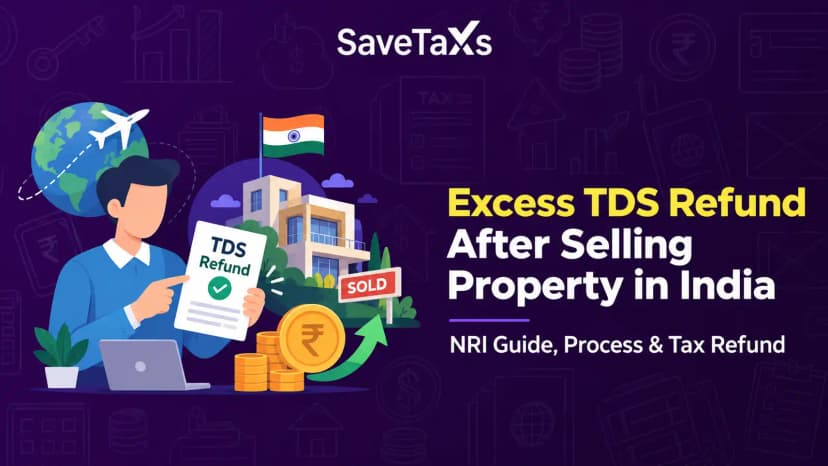
How to Claim Excess TDS Refund After Selling Property in India as an NRIHow to Claim Excess TDS Refund After Selling Property in India as an NRI
Written by Shubham Jain

_1768304909.webp&w=3840&q=75)
After your income tax return has been successfully filed, the Income Tax Department generates an ITR-V acknowledgment. This document confirms your ITR filing. However, the ITR-V acknowledgment is a password-protected PDF, which confuses many first-time ITR filers about how to open it and what the password is.
In this blog, we will be telling you exactly how you can open your ITR-V PDF file through the ITR PDF password.
A password ensures that no one other than you can access your information; hence, a strong password is the first line of defense against unauthorized or illegal access. Important financial government documents such as PAN, Form 16, ITR, etc., are protected with a strong password, ensuring your core information isn't accessible to unauthorized users.
Once you have filed your ITR return in India, you can download the acknowledgment form (ITR-V) as a PDF. The downloaded PDF is protected by a password, ensuring only its authorized user can access the information it holds.
The PDF password format for the ITR V acknowledgment PDF is the combination of your PAN number in lowercase and your date of birth in DDMMYYYY format. Additionally, you will need Adobe Reader 8.0 to open this PDF file.
If you are still diabolical about the PDF password format, here is how it is.
Suppose your PAN is BLOFS0000A and your DOB is January 19, 1995. With this information, your password to open the ITR V PDF document file will beblofs0000a19011995.
The ITR V acknowledgment PDF file is sent by the Income Tax department via email and can be opened by entering a password. You also have the option to download this file from the official website of the Income Tax Department. The following are ways to open the PDF file with a password.
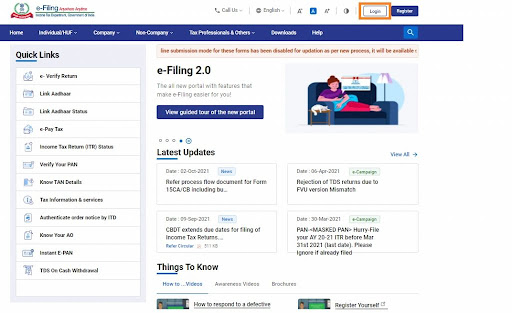
Step 1: Log in to the income tax e-filing website.
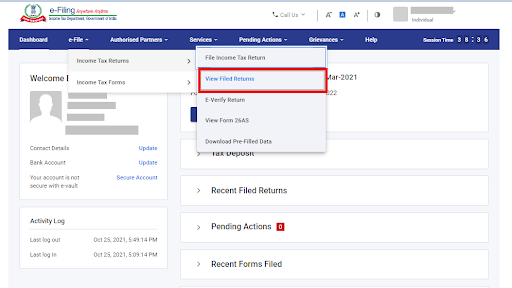
Step 2: Click on the "e-file" tab. From there, select the "Income tax returns" and "view filed returns" option to see your e-filed tax return.
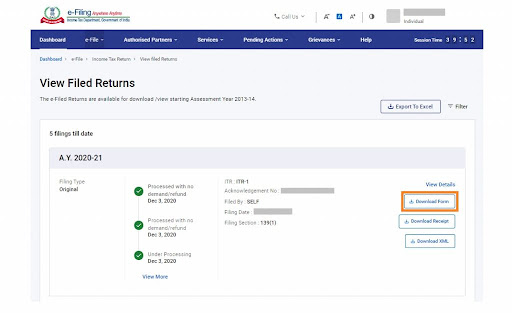
Step 3: To download the acknowledgment ITR-V file, click the "Download ITR V Form" button for the relevant assessment year.
Step 4: The acknowledgment form will then be downloaded. However, the information contained in the document is confidential, so it is password-protected.
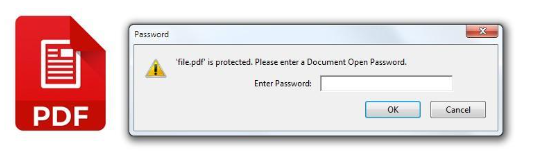
Step 5: To open this PDF, enter the password in the exact format discussed above. Ensure that there are no spaces while entering your PDF password combination. The PDF file will open.
The ITR V is the "income tax return verification". It is a verification document rolled out by the Indian Income Tax Department that confirms your ITR filing. When an individual files their ITR online without a digital signature, the ITR department issues an ITR V form as proof that the return was submitted successfully.
One thing to ensure is that this document needs to be verified either electronically (e-verification) or physically (by posting it to the CPC Bangalore (Centered Processing Center). Your return will be marked incomplete if verification isn't completed. The ITR V document has all your personal administrative information, such as your PAN, name, assessment year, ITR submission date, and more.
In case of offline mode, you need to send a copy of your ITR-V acknowledgement, signed, to the concerned center. For an online e-verification method, there are five ways to verify the return successfully. Those five e-verification methods include
Once you have downloaded the ITR-V, you can send it to the CPC Bangalore within 30 days of filing your ITR return to verify it offline. But before doing so, there are a few things to consider to ensure everything is in compliance.
NRIs, your ITR filing process in India has been simplified than ever with Savetaxs.
Using the information above and the clear steps, you can easily download your ITR PDF document and open it. Just ensure you verify your ITR return on time, or else it will be marked incomplete.
Additionally, if you need any professional guidance on downloading your ITR V PDF in compliance, Savetaxs can help you with it. Our experts will ensure that your NRI ITR is verified successfully and in compliance with the Income Tax Department rules and regulations.
Connect with us as we serve our clients 24/7 across all time zones.
This article is for general informational purposes only and does not constitute tax, legal, financial, or investment advice. Laws, regulations, rates, and procedures may change over time and may vary based on individual circumstances.
While SaveTaxs makes reasonable efforts to keep the information accurate and up to date, readers should verify applicable rules with official authorities or consult a qualified professional before making decisions based on this information.
Vipul Jain is the Co-Founder of SaveTaxs and a tax expert with experience in Indian and NRI taxation. He advises individuals, NRIs, and businesses on tax filing, tax planning, capital gains, DTAA, and compliance matters. He focuses on making complex tax concepts simple and helping taxpayers make informed, compliant decisions. See Full Bio
Want to read more? Explore Blogs